Setting Up CTYunOS Kernel Build Environment with Docker
ctyunos
ctyunos2-docker-22.06.02.x86_64
基于ctyunos2-docker-22.06.02.x86_64编译openeuler-4-19内核源码。
grep ctyunos2-docker yum_list.txt | grep -i 22.06 | grep -i x86
http://121.237.176.8:50001/ctyun/ctyunos/ctyunos-2/22.06/docker_img/x86_64/ctyunos2-docker-22.06.02.x86_64.tar.xz
http://121.237.176.8:50001/ctyun/ctyunos/ctyunos-2/22.06/docker_img/x86_64/ctyunos2-docker-22.06.02.x86_64.tar.xz.md5sum
http://121.237.176.8:50001/ctyun/ctyunos/ctyunos-2/22.06/docker_img/x86_64/ctyunos2-docker-22.06.03.x86_64.tar.xz
http://121.237.176.8:50001/ctyun/ctyunos/ctyunos-2/22.06/docker_img/x86_64/ctyunos2-docker.x86_64.tar.xz
http://121.237.176.8:50001/ctyun/ctyunos/ctyunos-2/22.06/docker_img/x86_64/ctyunos2-docker.x86_64.tar.xz.md5sum
也可在https://ctyunos.ctyun.cn/#/urllist中查找docker镜像。
将 ctyunos2-docker-22.06.02.x86_64.tar.xz 加载到 Docker 中,需先解压缩文件,然后使用 docker load 命令加载解压后的文件:
wget https://repo.ctyun.cn/hostos/ctyunos-22.06/docker_img/x86_64/ctyunos2-docker-22.06.x86_64.tar.xz

xz -d ctyunos2-docker-22.06.02.x86_64.tar.xz
docker load < ctyunos2-docker-22.06.02.x86_64.tar
docker images | grep 22.06
ctyunos2     22.06.1   a5c88430be77   2 years ago     530MB
ctyunos 22.06 a5c88430be77 2 years ago 530MB
启动容器ctyunos-22.06:
docker run -it \
  --name ctyunos-22.06 \
  -v /root/code/:/root/code \
  -v /root/code/rpmbuild:/root/rpmbuild \
  -v /root/Downloads:/root/Downloads \
  ctyunos2:22.06.1 /bin/bash
容器ctyunos-22.06会默认进入bash,下方操作在容器ctyunos-22.06所在终端中执行。
ctyunos2-docker-22.06.02.x86_64中的yum源有问题,需进行替换:
vim ctyunos.repo 并下方yum源写入:
[everything]
name=ctyunos-22.06-everything
baseurl=https://repo.ctyun.cn/hostos/ctyunos-22.06/everything/$basearch/
enabled=1
gpgcheck=0

[update]
name=ctyunos-22.06-update
baseurl=https://repo.ctyun.cn/hostos/ctyunos-22.06/update/$basearch/
enabled=1
gpgcheck=0

[debuginfo]
name=ctyunos-22.06-debuginfo
baseurl=https://repo.ctyun.cn/hostos/ctyunos-22.06/debuginfo/$basearch/
enabled=1
gpgcheck=0

# access by aone
[ctyunos2-22.06.02-all]
name = ctyunos2-22.06.2-all
baseurl =http://121.237.176.8:50001/ctyun/ctyunos/ctyunos-2/22.06/22.06.2/$basearch/
enabled = 1
gpgcheck = 0

# access by aone
[ctyunos-21.06.04-all]
name=ctyunos-21.06.04-all
baseurl=http://121.237.176.8:50001/ctyun/ctyunos/ctyunos-2/2.0.1/21.06.4/$basearch/
enabled=1
gpgcheck=0

# access by aone
[ctyunos2-debug]
name = ctyunos2 - debug
baseurl =http://121.237.176.8:50001/ctyun/ctyunos/ctyunos-2/22.06/debuginfo/$basearch/
enabled = 1
gpgcheck = 0
基于openeuler-4-19源码编译内核:
yum makecache
yum install dnf-plugins-core git bash-completion rpm-build rpmdevtools -y
cd /root/code/linux
git checkout openeuler-4-19/release-0068.y
yum-builddep build/spec/kernel.spec -y
./build/build.sh
bash 补全:
# 检查 ~/.bashrc 是否存在,如果不存在则创建
if [ ! -f ~/.bashrc ]; then
    touch ~/.bashrc
fi

# 追加内容到 ~/.bashrc(如果内容不存在)
if ! grep -q "enable bash completion" ~/.bashrc; then
    cat << 'EOF' >> ~/.bashrc
# enable bash completion
if [ -f /usr/share/bash-completion/bash_completion ]; then
        . /usr/share/bash-completion/bash_completion
fi
EOF
fi
删除/root/code/rpmbuild所有子目录内容:
生成标准 RPM 构建目录结构:
这会生成如下目录结构:
交叉编译
gcc-linaro-7.3.1-2018.05-x86_64_arm-linux-gnueabihf
https://releases.linaro.org/components/toolchain/binaries/7.3-2018.05/arm-linux-gnueabihf/
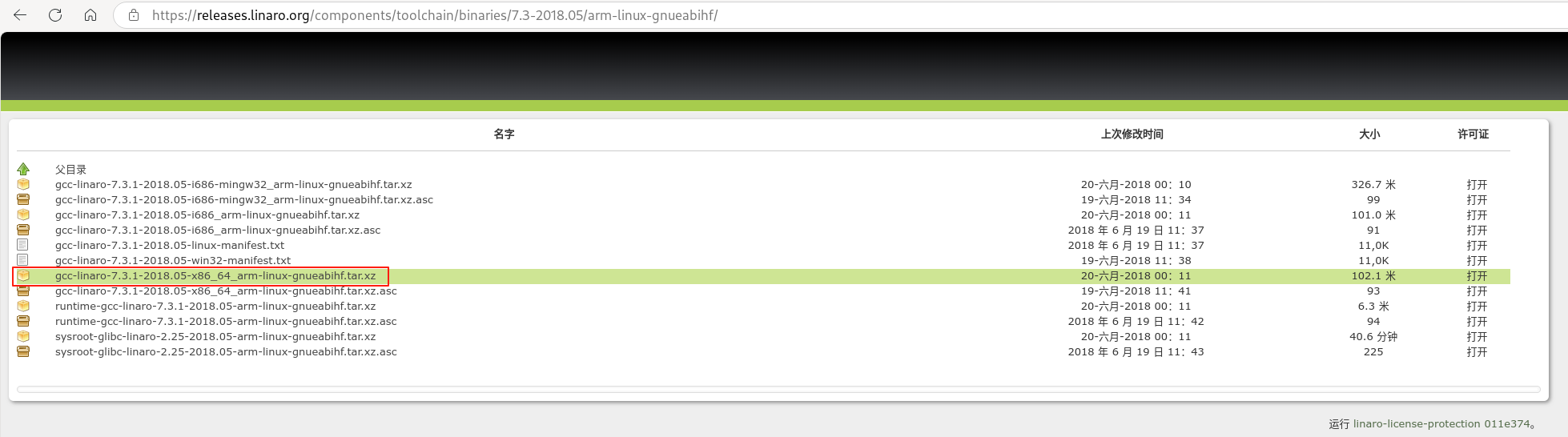
下载gcc-linaro-7.3.1-2018.05-x86_64_arm-linux-gnueabihf.tar.xz到目录/root/Downloads/cross_compile并解压:
tar -xJf gcc-linaro-7.3.1-2018.05-x86_64_arm-linux-gnueabihf.tar.xz
export CROSS_COMPILE=/root/Downloads/cross_compile/gcc-linaro-7.5.0-2019.12-x86_64_arm-linux-gnueabihf/bin/arm-linux-gnueabihf-
export ARCH=arm64
make openeuler_defconfig
make binrpm-pkg -j32
ctyunos3-docker-230117-x86_64.tar.xz
wget https://repo.ctyun.cn/hostos/ctyunos-23.01/docker_img/x86_64/ctyunos3-docker-230117-x86_64.tar.xz
xz -d ctyunos3-docker-230117-x86_64.tar.xz
docker run -it \
  --name ctyunos-23.01 \
  -v /root/code/:/root/code \
  -v /root/code/rpmbuild:/root/rpmbuild \
  -v /root/Downloads:/root/Downloads \
  ctyunos:23.01 /bin/bash
docker run -it \
  --name ctyunos-23.01 \
  -v /home/wujing/code:/home/wujing/code \
  -v /home/wujing/code/rpmbuild:/home/wujing/rpmbuild \
  -v /home/wujing/Downloads:/home/wujing/Downloads \
  -w /home/wujing/code \
  ctyunos:23.01 \
  /bin/bash
ctyunos3-docker-230117-x86_64中的yum源有问题,需进行替换:
vim ctyunos.repo 并下方yum源写入:
[everything]
name=ctyunos-everything
baseurl=https://repo.ctyun.cn/hostos/ctyunos-23.01/everything/$basearch/
enabled=1
gpgcheck=0

[update]
name=ctyunos-update
baseurl=https://repo.ctyun.cn/hostos/ctyunos-23.01/update/$basearch/
enabled=1
gpgcheck=0

[debuginfo]
name=ctyunos-debuginfo
baseurl=https://repo.ctyun.cn/hostos/ctyunos-23.01/debuginfo/$basearch/
enabled=1
gpgcheck=0

[extras]
name=ctyunos-extras
baseurl=https://repo.ctyun.cn/hostos/ctyunos-23.01/extras/$basearch/
gpgcheck=0
enabled=1

# access by aone
[aone-everything]
name=ctyunos-aone-everything
baseurl=http://121.237.176.8:50001/ctyun/ctyunos/ctyunos-23.01/everything/$basearch/
enabled=1
gpgcheck=0

# access by aone
[aone-update]
name=ctyunos-aone-update
baseurl=http://121.237.176.8:50001/ctyun/ctyunos/ctyunos-23.01/update/$basearch/
enabled=1
gpgcheck=0

# access by aone
[aone-debuginfo]
name=ctyunos-aone-debuginfo
baseurl=http://121.237.176.8:50001/ctyun/ctyunos/ctyunos-23.01/debuginfo/$basearch/
enabled=1
gpgcheck=0

# access by aone
[aone-extras]
name=ctyunos-aone-extras
baseurl=http://121.237.176.8:50001/ctyun/ctyunos/ctyunos-23.01/extras/$basearch/
enabled=1
gpgcheck=0
基于CTKernel-LTS-5.10源码编译内核:
yum makecache
yum install dnf-plugins-core git bash-completion -y
cd /root/code/linux
git checkout ctkernel-lts-5.10/develop-0088
yum-builddep build/kernel.spec -y
bash 补全:
# 检查 ~/.bashrc 是否存在,如果不存在则创建
if [ ! -f ~/.bashrc ]; then
    touch ~/.bashrc
fi

# 追加内容到 ~/.bashrc(如果内容不存在)
if ! grep -q "enable bash completion" ~/.bashrc; then
    cat << 'EOF' >> ~/.bashrc
# enable bash completion
if [ -f /usr/share/bash-completion/bash_completion ]; then
        . /usr/share/bash-completion/bash_completion
fi
EOF
fi
删除/root/code/rpmbuild所有子目录内容:
for dir in BUILD BUILDROOT RPMS SOURCES SPECS SRPMS; do
    rm -rf /root/rpmbuild/"$dir"/*
done

mkdir -p /root/rpmbuild/{BUILD,BUILDROOT,RPMS,SOURCES,SPECS,SRPMS}
编译内核rpm包:
rm -rf /root/rpmbuild/SOURCES/kernel.tar.gz
tar --xform="s/^./kernel/" --exclude=".git" -chzf /root/rpmbuild/SOURCES/kernel.tar.gz .
cp build/* /root/rpmbuild/SOURCES
time rpmbuild -ba build/kernel.spec
交叉编译
gcc-arm-10.3-2021.07-x86_64-aarch64-none-linux-gnu
https://blog.csdn.net/qq_37200742/article/details/128331909
https://www.cnblogs.com/solo666/p/16405064.html
https://developer.arm.com/downloads/-/arm-gnu-toolchain-downloads
https://developer.arm.com/downloads/-/gnu-a#panel4a
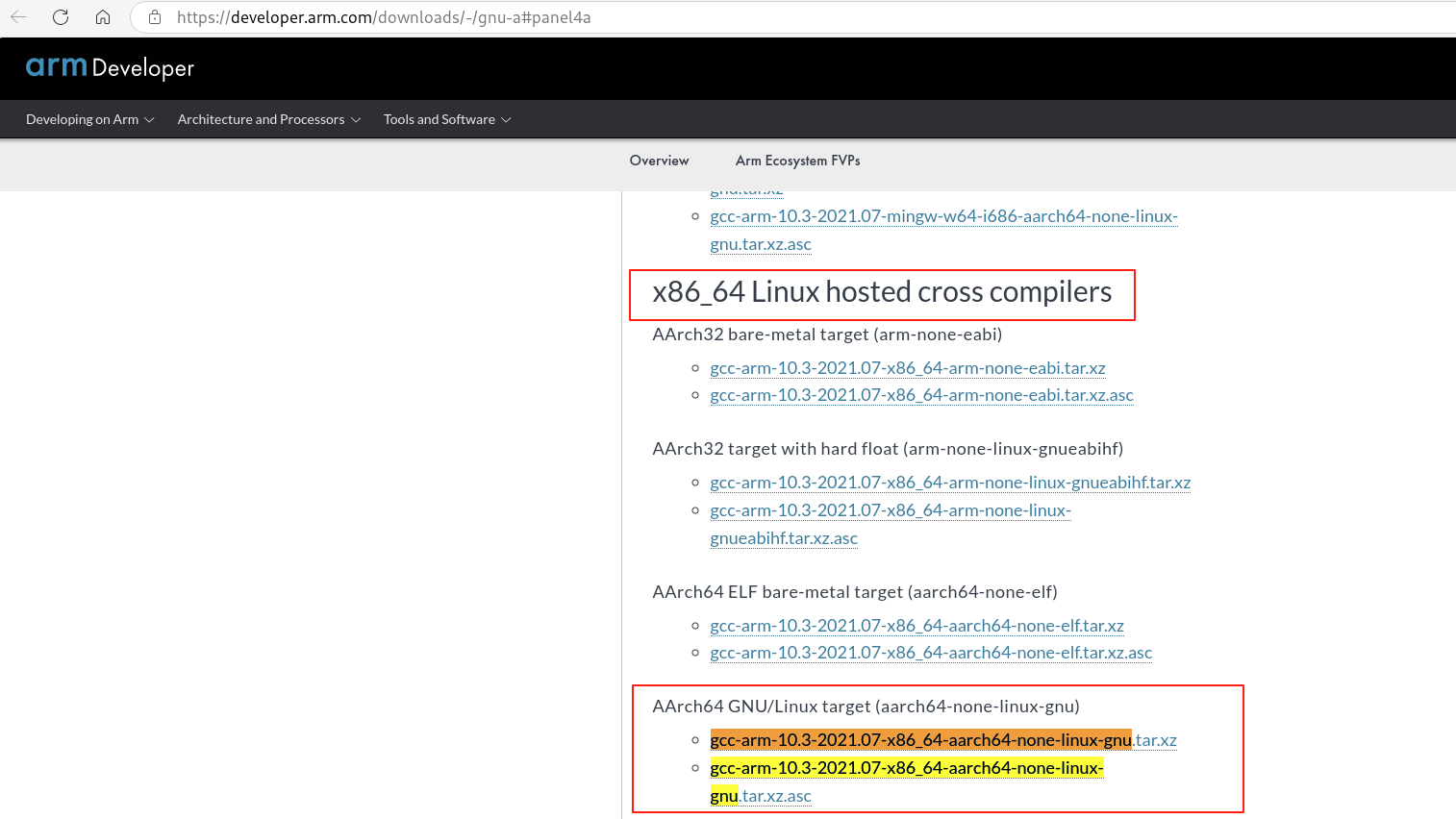
在浏览器中下载上述gcc-arm-10.3交叉编译工具链到目录/root/Downloads/cross_compile/后进行如下操作:
tar -xJf gcc-arm-10.3-2021.07-x86_64-aarch64-none-linux-gnu.tar.xz
export CROSS_COMPILE=/root/Downloads/cross_compile/gcc-arm-10.3-2021.07-x86_64-aarch64-none-linux-gnu/bin/aarch64-none-linux-gnu-
export ARCH=arm64
make openeuler_defconfig
make binrpm-pkg -j32
使用rpmbuild编译内核,参见脚本:linux/shell/rpmbuild_kernel_arm.sh。
ctyunos2-docker-2-24.07.x86_64
基于ctyunos2-docker-2-24.07.x86_64编译CTKernel内核源码。
https://repo.ctyun.cn/hostos/ctyunos-2-24.07/docker_img/x86_64/ctyunos2-docker-2-24.07.x86_64.tar.xz
https://repo.ctyun.cn/hostos/ctyunos-2-24.07/docker_img/aarch64/ctyunos2-docker-2-24.07.aarch64.tar.xz
将 ctyunos2-docker-2-24.07.x86_64.tar.xz 加载到 Docker 中,需先解压缩文件,然后使用 docker load 命令加载解压后的文件:
wget https://repo.ctyun.cn/hostos/ctyunos-2-24.07/docker_img/x86_64/ctyunos2-docker-2-24.07.x86_64.tar.xz
docker load < ctyunos2-docker-2-24.07.x86_64.tar
xz -d ctyunos2-docker-2-24.07.x86_64.tar.xz
启动容器ctyunos2-24.07-20240716205118:
docker run -it \
  --name ctyunos2-24.07-20240716205118 \
  -v /root/code/:/root/code \
  -v /root/code/rpmbuild:/root/rpmbuild \
  -v /root/Downloads:/root/Downloads \
  ctyunos2:24.07-20240716205118 /bin/bash
容器ctyunos2-24.07-20240716205118会默认进入bash,下方操作在容器ctyunos2-24.07-20240716205118所在终端中执行。
基于CTKernel源码编译内核:
当前编译的是分支publish-ALL,也可用git切换到任意分支编译:
bash-5.1# git branch
  ctbbm-dew
  ctkernel-lts/develop
  feature-ctbbm
  feature-ctbbm-tmp
  feature-ctbbm-yql
  publish
* publish-ALL
  publish-ALL-yql
  publish-ALL-yql-comment
  publish-ALL-yql-tmp