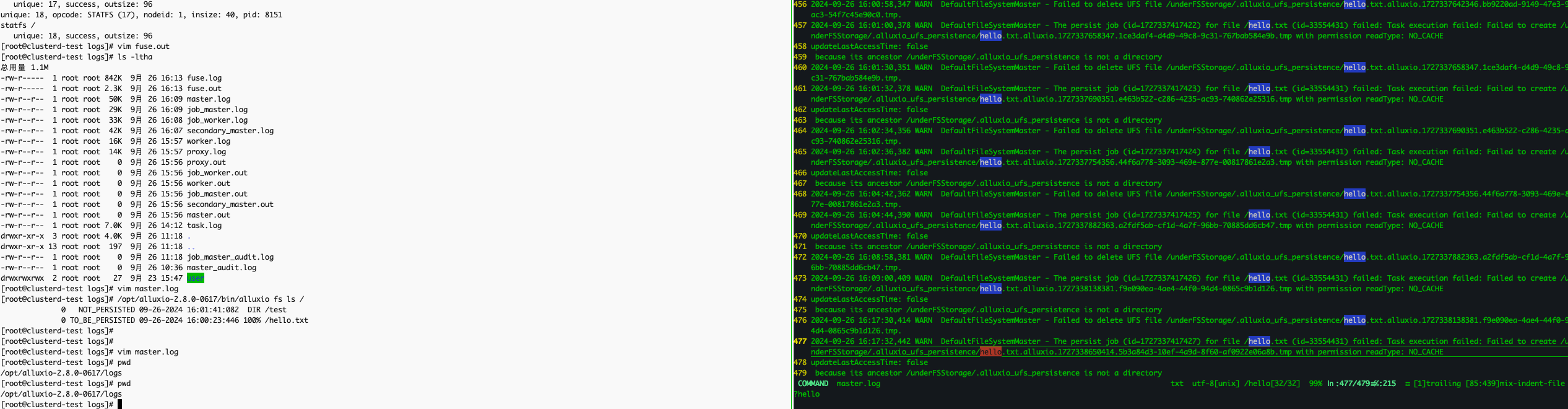
ls: 无法访问 '/mnt/alluxio-fuse': 输入/输出错误
bug复现
alluxio-fuse挂载前
再次ls上级目录:
[root@clusterd-test ~]# ll /runtime-mnt/alluxio/default/hbase3/
总用量 0
drwxr-xr-x 2 root root 6  9月 14 18:43 alluxio-12
drwxr-xr-x 2 root root 6  9月 19 10:40 alluxio-13
drwxr-xr-x 2 root root 6  9月 18 09:08 alluxio-18
drwxr-xr-x 2 root root 6  9月 18 12:08 alluxio-19
drwxr-x--- 2 root root 6  9月 13 14:42 alluxio-fuse
[root@clusterd-test ~]# stat /runtime-mnt/alluxio/default/hbase3/alluxio-12
  文件:/runtime-mnt/alluxio/default/hbase3/alluxio-12
  大小:6               块:0          IO 块:65536  目录
设备:fd00h/64768d      Inode:120964219   硬链接:2
权限:(0755/drwxr-xr-x)  Uid:(    0/    root)   Gid:(    0/    root)
最近访问:2024-09-24 16:48:55.059422065 +0800
最近更改:2024-09-14 18:43:53.464275678 +0800
最近改动:2024-09-14 18:43:53.464275678 +0800
创建时间:2024-09-14 18:43:53.464275678 +0800
查看/runtime-mnt/alluxio/default/hbase3/alluxio-12所在文件系统的信息:
[root@clusterd-test ~]# stat -f /runtime-mnt/alluxio/default/hbase3/alluxio-12
  文件:"/runtime-mnt/alluxio/default/hbase3/alluxio-12"
    ID:fd0000000000 文件名长度:255     类型:xfs
块大小:4096       基本块大小:4096
    块:总计:41935360   空闲:20996469   可用:20996469
Inodes: 总计:83886080   空闲:83133048
[root@clusterd-test ~]# df -T /runtime-mnt/alluxio/default/hbase3/alluxio-12
文件系统                   类型     1K-块     已用     可用 已用% 挂载点
/dev/mapper/system-lv_root xfs  167741440 83755564 83985876   50% /
alluxio-fuse挂载
使用alluxio-fuse挂载fuse用户态文件系统:
[root@clusterd-test ~]# /entrypoint.sh fuse --fuse-opts=kernel_cache,ro,attr_timeout=7200,entry_timeout=7200,allow_other,max_readahead=0 /runtime-mnt/alluxio/default/hbase3/alluxio-12 /

Path /runtime-mnt/alluxio/default/hbase3/alluxio-12 is not mounted
Starting AlluxioFuse process: mounting alluxio path "/" to local mount point "/runtime-mnt/alluxio/default/hbase3/alluxio-12"
2024-09-24 19:45:46,760 INFO  AlluxioFuse - Alluxio version: 2.8.1-SNAPSHOT-5a002cedeb7b188aa83eca39c5ab9615929547b3
2024-09-24 19:45:47,041 INFO  LibFuse - JNIFUSE_SHAREDLIB_DIR / temp dir: null
2024-09-24 19:45:47,043 INFO  NativeLibraryLoader - sharedLibraryName: jnifuse3, jniLibraryName: jnifuse3jni-linux-aarch64, sharedLibraryFileName: libjnifuse3.so, jniLibraryFileName: libjnifuse3jni-linux-aarch64.so.
2024-09-24 19:45:47,046 INFO  NativeLibraryLoader - loadLibraryFromJarToTemp params: libjnifuse3.so,libjnifuse3jni-linux-aarch64.so,null
2024-09-24 19:45:47,048 INFO  NativeLibraryLoader - temp file: /tmp/libjnifuse8025725468782352104.so
2024-09-24 19:45:47,052 INFO  NativeLibraryLoader - libPath /tmp/libjnifuse8025725468782352104.so
INFO ../../src/main/native/libjnifuse/jnifuse_onload.cc:25 Loaded libjnifuse
2024-09-24 19:45:47,052 INFO  NativeLibraryLoader - Loaded lib by jar from path /tmp/libjnifuse8025725468782352104.so.
2024-09-24 19:45:47,052 INFO  NativeLibraryLoader - Loaded libjnifuse with libfuse version 3.
2024-09-24 19:45:47,133 INFO  MetricsSystem - Starting sinks with config: {}.
2024-09-24 19:45:47,138 INFO  MetricsHeartbeatContext - Created metrics heartbeat with ID app-3246309585540611550. This ID will be used for identifying info from the client. It can be set manually through the alluxio.user.app.id property
2024-09-24 19:45:47,283 INFO  NettyUtils - EPOLL_MODE is available
2024-09-24 19:45:48,059 INFO  TieredIdentityFactory - Initialized tiered identity TieredIdentity(node=, rack=null)
2024-09-24 19:45:48,319 INFO  Reflections - Reflections took 156 ms to scan 1 urls, producing 58 keys and 199 values
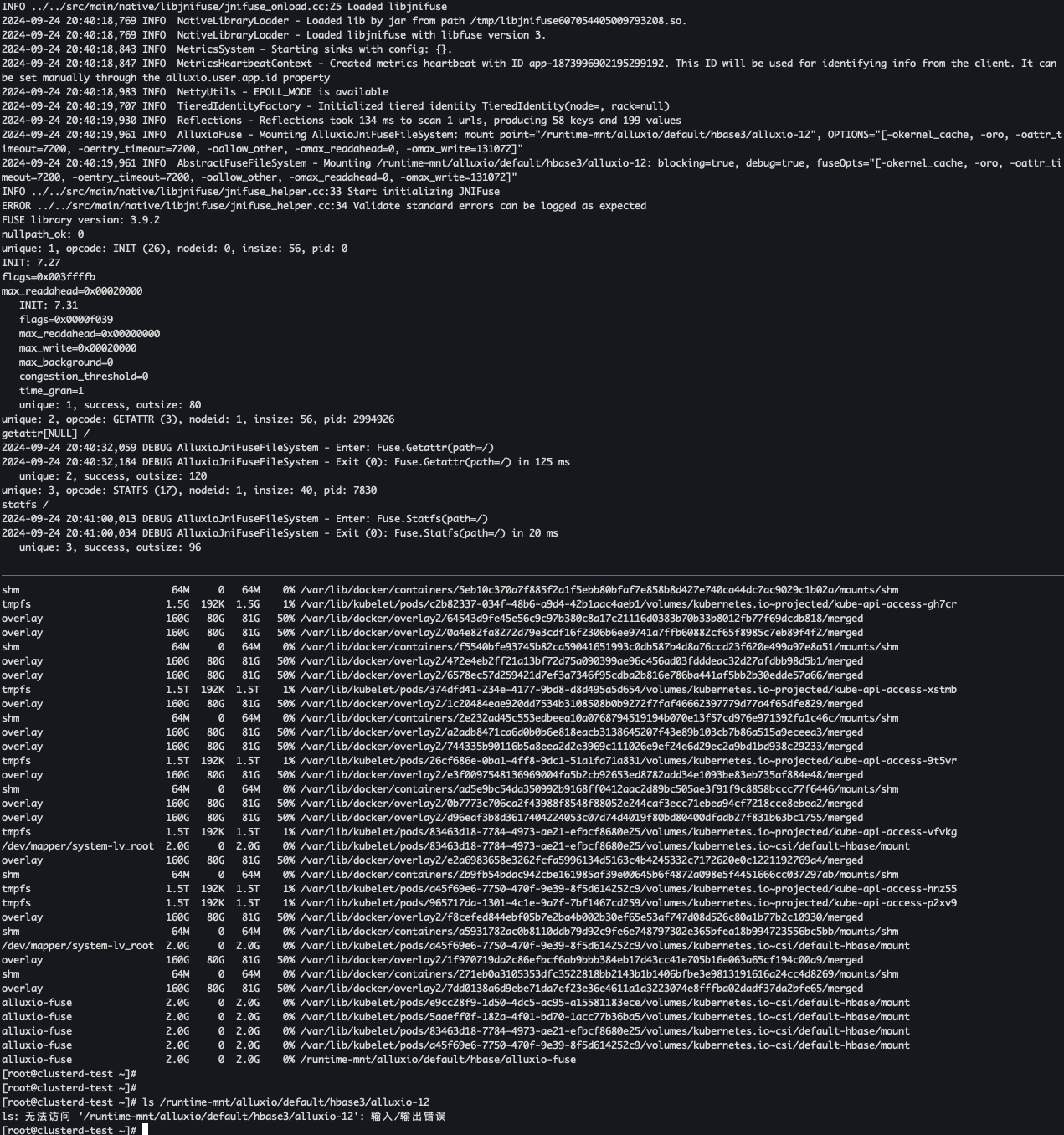
2024-09-24 19:45:48,356 INFO  AlluxioFuse - Mounting AlluxioJniFuseFileSystem: mount point="/runtime-mnt/alluxio/default/hbase3/alluxio-12", OPTIONS="[-okernel_cache, -oro, -oattr_timeout=7200, -oentry_timeout=7200, -oallow_other, -omax_readahead=0, -omax_write=131072]"
2024-09-24 19:45:48,356 INFO  AbstractFuseFileSystem - Mounting /runtime-mnt/alluxio/default/hbase3/alluxio-12: blocking=true, debug=true, fuseOpts="[-okernel_cache, -oro, -oattr_timeout=7200, -oentry_timeout=7200, -oallow_other, -omax_readahead=0, -omax_write=131072]"
INFO ../../src/main/native/libjnifuse/jnifuse_helper.cc:33 Start initializing JNIFuse
ERROR ../../src/main/native/libjnifuse/jnifuse_helper.cc:34 Validate standard errors can be logged as expected
FUSE library version: 3.9.2
nullpath_ok: 0
unique: 1, opcode: INIT (26), nodeid: 0, insize: 56, pid: 0
另起终端执行stat命令,报错如下:
[root@clusterd-test ~]# stat /runtime-mnt/alluxio/default/hbase3/alluxio-12
stat: cannot statx '/runtime-mnt/alluxio/default/hbase3/alluxio-12': 输入/输出错误
ls上级目录,报错如下:
[root@clusterd-test ~]# ll /runtime-mnt/alluxio/default/hbase3/
ls: 无法访问 '/runtime-mnt/alluxio/default/hbase3/alluxio-12': 输入/输出错误
总用量 0
d????????? ? ?    ?    ?             ? alluxio-12
drwxr-xr-x 2 root root 6  9月 19 10:40 alluxio-13
drwxr-xr-x 2 root root 6  9月 18 09:08 alluxio-18
drwxr-xr-x 2 root root 6  9月 18 12:08 alluxio-19
drwxr-x--- 2 root root 6  9月 13 14:42 alluxio-fuse
查看/runtime-mnt/alluxio/default/hbase3/alluxio-12所在文件系统的信息:
[root@clusterd-test openeuler-4-19]# stat -f /runtime-mnt/alluxio/default/hbase3/alluxio-12
  文件:"/runtime-mnt/alluxio/default/hbase3/alluxio-12"
    ID:0        文件名长度:255     类型:fuseblk
块大小:16384      基本块大小:16384
    块:总计:131072     空闲:131072     可用:131072
Inodes: 总计:18446744073709551615 空闲:-1
df -T /runtime-mnt/alluxio/default/hbase3/alluxio-12
df: /runtime-mnt/alluxio/default/hbase3/alluxio-12: 输入/输出错误
alluxio-fuse 卸载
/entrypoint.sh fuse --fuse-opts=kernel_cache,ro,attr_timeout=7200,entry_timeout=7200,allow_other,max_readahead=0 -o debug /runtime-mnt/alluxio/default/hbase3/alluxio-12 /

mount执行上面命令就行。 当kill进程的时候,会自动umount
使用ctrl + c终止进程:
^C2024-09-24 19:44:25,517 INFO  AbstractFuseFileSystem - Unmounting Fuse through shutdown hook
2024-09-24 19:44:25,517 INFO  AbstractFuseFileSystem - Umounting /runtime-mnt/alluxio/default/hbase3/alluxio-12
INFO ../../src/main/native/libjnifuse/jnifuse_helper.cc:88 JNIFuse initialized
再次通过alluxio-fuse挂载
再次通过alluxio-fuse挂载后,立马执行下方命令:
可以观察到/entrypoint.sh fuse --fuse-opts=kernel_cache,ro,attr_timeout=7200,entry_timeout=7200,allow_other,max_readahead=0 -o debug /runtime-mnt/alluxio/default/hbase3/alluxio-12 /所在终端有如下内容输出:
unique: 2, opcode: GETATTR (3), nodeid: 1, insize: 56, pid: 3002909
getattr[NULL] /
2024-09-24 20:47:37,335 DEBUG AlluxioJniFuseFileSystem - Enter: Fuse.Getattr(path=/)
2024-09-24 20:47:37,566 DEBUG AlluxioJniFuseFileSystem - Exit (0): Fuse.Getattr(path=/) in 231 ms
   unique: 2, success, outsize: 120
之前反馈的挂载进程所在终端没有收到内核fuse转发过来的getattr应该是后续再次ls的时候,毕竟有缓存。
这一部分日志显示了 Alluxio FUSE 文件系统处理 GETATTR 请求的细节。以下是每一行的详细解释:
1. FUSE 请求: GETATTR
- 解释: 这是一条来自 FUSE 的
GETATTR请求,代表文件系统查询文件或目录的元数据。在此例中,GETATTR针对根目录/进行。 unique: 2: 该请求的唯一标识符。opcode: GETATTR (3): 操作码 3 对应GETATTR,用于获取文件属性。nodeid: 1: 这是文件系统根节点的 ID。insize: 56: 请求的输入大小为 56 字节。pid: 3002909: 这是发起该请求的进程 ID。getattr[NULL] /: 表示获取根目录/的属性。
2. AlluxioJniFuseFileSystem 处理 GETATTR 请求
- 解释: Alluxio FUSE 文件系统接收到
GETATTR请求,并开始处理。路径为根目录/。
3. 处理完成并返回结果
- 解释: Alluxio FUSE 完成了
GETATTR请求的处理。整个过程耗时 231 毫秒,返回了成功状态码(0),表示操作成功。
4. FUSE 响应
- 解释: 请求
unique: 2成功,输出数据大小为 120 字节,返回了文件系统的属性信息。
GETATTR 操作的背景
GETATTR请求通常用于查询文件或目录的元数据,比如文件大小、权限、最后修改时间等。在文件系统挂载时,系统通常会定期发出此请求来获取或验证文件系统的状态,尤其是针对根目录。
通过这个日志,您可以看到 FUSE 通过 GETATTR 操作与 Alluxio 文件系统通信,成功获取了根目录的属性并且快速返回了结果。
总结
Getattr 操作主要用于获取路径的元数据信息,当前操作是针对根目录 /。请求成功,并且在 125 毫秒内返回了所需信息。
alluxio-fuse server
kubectl get pod hbase-fuse-sh7jm -o wide
NAME               READY   STATUS    RESTARTS   AGE   IP           NODE            NOMINATED NODE   READINESS GATES
hbase-fuse-sh7jm   1/1     Running   0          15m   172.17.0.5   clusterd-test   <none>           <none>
kubectl get nodes -o wide
NAME            STATUS   ROLES                  AGE   VERSION   INTERNAL-IP   EXTERNAL-IP   OS-IMAGE        KERNEL-VERSION                         CONTAINER-RUNTIME
clusterd-test   Ready    control-plane,master   20d   v1.23.0   172.17.0.5    <none>        CTyunOS 22.06   4.19.90-2102.2.0.0068.3.ctl2.aarch64   docker://20.10.12
根因定位
strace -f -e trace=file -T -o ls.log -tt ls /runtime-mnt/alluxio/default/hbase3/alluxio-12

vim ls.log

1756339 17:05:19.488111 statx(AT_FDCWD, "/runtime-mnt/alluxio/default/hbase3/alluxio-12", AT_STATX_SYNC_AS_STAT, STATX_MODE, 0xffffeffcfd28) = -1 EIO (输入/输出错误) <0.000042>
strace -e trace=statx ls /runtime-mnt/alluxio/default/hbase3/alluxio-12
statx(AT_FDCWD, "/runtime-mnt/alluxio/default/hbase3/alluxio-12", AT_STATX_SYNC_AS_STAT, STATX_MODE, 0xffffd98b1e48) = -1 EIO (输入/输出错误)
ls: 无法访问 '/runtime-mnt/alluxio/default/hbase3/alluxio-12': 输入/输出错误
+++ exited with 2 +++
ltrace -e 'statx' ls /runtime-mnt/alluxio/default/hbase3/alluxio-12
ls->statx(0xffffff9c, 0xffffeb51f5bb, 0, 2)                                                                                   = 0xffffffff
ls: 无法访问 '/runtime-mnt/alluxio/default/hbase3/alluxio-12': 输入/输出错误
+++ exited (status 2) +++
mount
alluxio-fuse
使用trace-cmd追踪alluxio-fuse mount关键流程:
trace-cmd record -p function_graph -g fuse_mount /entrypoint.sh fuse --fuse-opts=kernel_cache,ro,attr_timeout=7200,entry_timeout=7200,allow_other,max_readahead=0 /runtime-mnt/alluxio/default/hbase3/alluxio-12 /
trace-cmd report > trace-cmd-alluxio-12-mount.log
vim trace-cmd-alluxio-12-mount.log
比对trace-cmd-alluxio-12-mount.log、trace-cmd-hello-mount.log暂时未发现mount过程有异常。
使用bpf trace追踪内核ksys_mount返回值:
[root@clusterd-test ~]# /usr/share/bcc/tools/trace -tKU 'r::ksys_mount "ret: %d", retval'
TIME     PID     TID     COMM            FUNC             -
39.40517 2923801 2924711 java            ksys_mount       ret: 0
        b'mount+0x8 [libc-2.28.so]'
        b'[unknown] [libfuse3.so.3.9.2]'
        b'fuse_session_mount+0xa4 [libfuse3.so.3.9.2]'
        b'fuse_main_real+0x104 [libfuse3.so.3.9.2]'
        b'Java_alluxio_jnifuse_LibFuse_fuse_1main_1real+0x334 [libjnifuse6706649452947292067.so]'
        b'[unknown]'
        b'[unknown]'
        b'[unknown]'
        b'[unknown]'
        b'[unknown]'
        b'[unknown]'
        b'JavaCalls::call_helper(JavaValue*, methodHandle*, JavaCallArguments*, Thread*)+0xe1c [libjvm.so]'
        b'jni_invoke_static(JNIEnv_*, JavaValue*, _jobject*, JNICallType, _jmethodID*, JNI_ArgumentPusher*, Thread*) [clone .isra.82] [clone .constprop.125]+0x1c4 [libjvm.so]'
        b'jni_CallStaticVoidMethod+0x150 [libjvm.so]'
        b'JavaMain+0xb60 [libjli.so]'
        b'[unknown] [libpthread-2.28.so]'
        b'[unknown] [libc-2.28.so]'
使用bpf trace追踪内核do_mount返回值:
[root@clusterd-test ~]# /usr/share/bcc/tools/trace -tKU 'r::do_mount "ret: %d", retval'
TIME     PID     TID     COMM            FUNC             -
34.82073 2923801 2924711 java            do_mount         ret: 0
        b'mount+0x8 [libc-2.28.so]'
        b'[unknown] [libfuse3.so.3.9.2]'
        b'fuse_session_mount+0xa4 [libfuse3.so.3.9.2]'
        b'fuse_main_real+0x104 [libfuse3.so.3.9.2]'
        b'Java_alluxio_jnifuse_LibFuse_fuse_1main_1real+0x334 [libjnifuse6706649452947292067.so]'
        b'[unknown]'
        b'[unknown]'
        b'[unknown]'
        b'[unknown]'
        b'[unknown]'
        b'[unknown]'
        b'JavaCalls::call_helper(JavaValue*, methodHandle*, JavaCallArguments*, Thread*)+0xe1c [libjvm.so]'
        b'jni_invoke_static(JNIEnv_*, JavaValue*, _jobject*, JNICallType, _jmethodID*, JNI_ArgumentPusher*, Thread*) [clone .isra.82] [clone .constprop.125]+0x1c4 [libjvm.so]'
        b'jni_CallStaticVoidMethod+0x150 [libjvm.so]'
        b'JavaMain+0xb60 [libjli.so]'
        b'[unknown] [libpthread-2.28.so]'
        b'[unknown] [libc-2.28.so]'
fuse hello
借助fuse使用手册编写demo hello协助定位问题。
fuse hello 挂载命令:
确认fuse hello是否挂载成功:
mount | grep -i hello
hello on /runtime-mnt/alluxio/default/hbase3/alluxio-13 type fuse.hello (rw,nosuid,nodev,relatime,user_id=0,group_id=0)
fuse hello 卸载命令:
使用trace-cmd追踪fuse hello mount关键流程:
trace-cmd record -p function_graph -g fuse_mount /root/jalon/fuse/libfuse/build/example/hello /runtime-mnt/alluxio/default/hbase/alluxio-13
trace-cmd report > trace-cmd-hello-mount.log
vim trace-cmd-hello-mount.log
使用bpf trace追踪内核do_mount返回值:
/usr/share/bcc/tools/trace -tKU 'r::do_mount "ret: %d", retval'
TIME     PID     TID     COMM            FUNC             -
6.886605 2922935 2922935 hello           do_mount         ret: 0
        b'mount+0x8 [libc-2.28.so]'
        b'fuse_kern_mount+0xd0 [libfuse3.so.3.17.0]'
        b'fuse_session_mount+0xb4 [libfuse3.so.3.17.0]'
        b'fuse_main_real_317+0xf0 [libfuse3.so.3.17.0]'
        b'main+0xdc [hello]'
        b'__libc_start_main+0xe0 [libc-2.28.so]'
        b'_start+0x34 [hello]'
使用bpf trace追踪内核ksys_mount返回值:
[root@clusterd-test ~]# /usr/share/bcc/tools/trace -tKU 'r::ksys_mount "ret: %d", retval'
168.7621 2927116 2927116 hello           ksys_mount       ret: 0
        b'mount+0x8 [libc-2.28.so]'
        b'fuse_kern_mount+0xd0 [libfuse3.so.3.17.0]'
        b'fuse_session_mount+0xb4 [libfuse3.so.3.17.0]'
        b'fuse_main_real_317+0xf0 [libfuse3.so.3.17.0]'
        b'main+0xdc [hello]'
        b'__libc_start_main+0xe0 [libc-2.28.so]'
        b'_start+0x34 [hello]'
statx
alluxio-fuse
trace-cmd record -p function_graph -g vfs_statx ls /runtime-mnt/alluxio/default/hbase3/alluxio-12
trace-cmd report > trace-cmd-alluxio-fuse-ls.log
vim trace-cmd-alluxio-fuse-ls.log
fuse hello
trace-cmd record -p function_graph -g vfs_statx ls /runtime-mnt/alluxio/default/hbase3/alluxio-13
trace-cmd report > trace-cmd-hello-ls.log
vim trace-cmd-hello-ls.log
diff
// vim trace-cmd-alluxio-fuse-ls.log +116075

116074            <...>-3002909 [092] 1572337.713185: funcgraph_entry:        0.490 us   |            fuse_invalid_attr();
116075            <...>-3002909 [092] 1572337.713186: funcgraph_entry:                   |            make_bad_inode() {
116076            <...>-3002909 [092] 1572337.713187: funcgraph_entry:        1.310 us   |              __remove_inode_hash();
116077            <...>-3002909 [092] 1572337.713188: funcgraph_entry:                   |              current_time() {
116078            <...>-3002909 [092] 1572337.713189: funcgraph_entry:        0.280 us   |                ktime_get_coarse_real_ts64();
116079            <...>-3002909 [092] 1572337.713189: funcgraph_entry:        0.280 us   |                timespec64_trunc();
116080            <...>-3002909 [092] 1572337.713190: funcgraph_exit:         1.410 us   |              }
// vim trace-cmd-hello-ls.log +15304

15304            <...>-2600990 [177] 1538768.536944: funcgraph_entry:        0.440 us   |            fuse_invalid_attr();
15305            <...>-2600990 [177] 1538768.536945: funcgraph_entry:                   |            time_to_jiffies.part.4() {
15306            <...>-2600990 [177] 1538768.536945: funcgraph_entry:        0.310 us   |              timespec64_to_jiffies();
15307            <...>-2600990 [177] 1538768.536945: funcgraph_exit:         0.830 us   |            }
15308            <...>-2600990 [177] 1538768.536946: funcgraph_entry:                   |            fuse_change_attributes() {
15309            <...>-2600990 [177] 1538768.536946: funcgraph_entry:                   |              fuse_change_attributes_common() {
15310            <...>-2600990 [177] 1538768.536947: funcgraph_entry:        0.250 us   |                set_nlink();
15311            <...>-2600990 [177] 1538768.536947: funcgraph_entry:                   |                make_kuid() {
15312            <...>-2600990 [177] 1538768.536948: funcgraph_entry:        0.270 us   |                  map_id_range_down();
15313            <...>-2600990 [177] 1538768.536948: funcgraph_exit:         0.770 us   |                }
alluxio-fuse在fuse_invalid_attr函数附近出了问题:
// vim -t fuse_do_getattr
898 static int fuse_do_getattr(struct inode *inode, struct kstat *stat,
899                struct file *file)
900 {
901     int err;                               // 错误码变量
902     struct fuse_getattr_in inarg;           // FUSE 输入参数结构体,用于 GETATTR 请求
903     struct fuse_attr_out outarg;            // FUSE 输出参数结构体,用于存储返回的文件属性
904     struct fuse_conn *fc = get_fuse_conn(inode); // 获取 FUSE 连接信息
905     FUSE_ARGS(args);                        // 定义 FUSE 请求/响应参数结构体
906     u64 attr_version;                       // 属性版本号变量
907
908     attr_version = fuse_get_attr_version(fc); // 获取当前文件系统的属性版本
909
910     memset(&inarg, 0, sizeof(inarg));       // 初始化 GETATTR 输入参数
911     memset(&outarg, 0, sizeof(outarg));     // 初始化 GETATTR 输出参数
912     /* Directories have separate file-handle space */  // 目录具有独立的文件句柄空间
913     if (file && S_ISREG(inode->i_mode)) {   // 如果是文件类型并且文件句柄存在
914         struct fuse_file *ff = file->private_data;  // 获取文件句柄的私有数据
915
916         inarg.getattr_flags |= FUSE_GETATTR_FH;  // 设置 GETATTR 标志位以使用文件句柄
917         inarg.fh = ff->fh;               // 将文件句柄存储到输入参数中
918     }
919     args.in.h.opcode = FUSE_GETATTR;          // 设置 FUSE 操作码为 GETATTR
920     args.in.h.nodeid = get_node_id(inode);    // 设置要查询的 inode 的节点 ID
921     args.in.numargs = 1;                      // 设置输入参数的个数为 1
922     args.in.args[0].size = sizeof(inarg);     // 设置第一个输入参数的大小
923     args.in.args[0].value = &inarg;           // 设置第一个输入参数的值为 inarg
924     args.out.numargs = 1;                     // 设置输出参数的个数为 1
925     args.out.args[0].size = sizeof(outarg);   // 设置第一个输出参数的大小
926     args.out.args[0].value = &outarg;         // 设置第一个输出参数的值为 outarg
927     err = fuse_simple_request(fc, &args);     // 发送 GETATTR 请求并等待响应
928     if (!err) {                               // 如果请求成功
929         if (fuse_invalid_attr(&outarg.attr) ||  // 检查返回的属性是否有效
930             (inode->i_mode ^ outarg.attr.mode) & S_IFMT) { // 检查 inode 类型是否匹配
931             make_bad_inode(inode);            // 如果无效,则标记 inode 为坏节点
932             err = -EIO;                      // 返回 I/O 错误
933         } else {
934             fuse_change_attributes(inode, &outarg.attr,  // 更新 inode 的属性
935                            attr_timeout(&outarg),        // 设置属性超时
936                            attr_version);               // 使用最新的属性版本
937             if (stat)                                  // 如果传入了 kstat 结构
938                 fuse_fillattr(inode, &outarg.attr, stat); // 填充 kstat 结构
939         }
940     }
进一步查看git相关提交:
git log -S 'if (fuse_invalid_attr(&outarg.attr)' --oneline fs/fuse/dir.c | cat
eb59bd17d2fa fuse: verify attributes
关键函数定位
fuse_getattr
// vim -t fuse_getattr

1829 static int fuse_getattr(const struct path *path, struct kstat *stat,
1830             u32 request_mask, unsigned int flags)
1831 {
1832     struct inode *inode = d_inode(path->dentry);
1833     struct fuse_conn *fc = get_fuse_conn(inode);
1834
1835     if (!fuse_allow_current_process(fc))
1836         return -EACCES;
1837
1838     return fuse_update_get_attr(inode, NULL, stat, flags);
1839 }
1840
1841 static const struct inode_operations fuse_dir_inode_operations = {
1842     .lookup     = fuse_lookup,
1843     .mkdir      = fuse_mkdir,
1844     .symlink    = fuse_symlink,
1845     .unlink     = fuse_unlink,
1846     .rmdir      = fuse_rmdir,
1847     .rename     = fuse_rename2,
1848     .link       = fuse_link,
1849     .setattr    = fuse_setattr,
1850     .create     = fuse_create,
1851     .atomic_open    = fuse_atomic_open,
1852     .mknod      = fuse_mknod,
1853     .permission = fuse_permission,
1854     .getattr    = fuse_getattr,
1855     .listxattr  = fuse_listxattr,
1856     .get_acl    = fuse_get_acl,
1857     .set_acl    = fuse_set_acl,
1858 };
fuse_update_get_attr
// vim -t fuse_update_get_attr

 944 static int fuse_update_get_attr(struct inode *inode, struct file *file,
 945                 struct kstat *stat, unsigned int flags)
 946 {
 947     struct fuse_inode *fi = get_fuse_inode(inode);
 948     int err = 0;
 949     bool sync;
 950
 951     if (flags & AT_STATX_FORCE_SYNC)
 952         sync = true;
 953     else if (flags & AT_STATX_DONT_SYNC)
 954         sync = false;
 955     else
 956         sync = time_before64(fi->i_time, get_jiffies_64());
 957
 958     if (sync) {
 959         forget_all_cached_acls(inode);
 960         err = fuse_do_getattr(inode, stat, file);
 961     } else if (stat) {
 962         generic_fillattr(inode, stat);
 963         stat->mode = fi->orig_i_mode;
 964         stat->ino = fi->orig_ino;
 965     }
 966
 967     return err;
 968 }
fuse_update_get_attr函数在960行跳到了上文的fuse_do_getattr函数处。
fuse_do_getattr
接下来重点分析fuse_do_getattr函数929、930行:
929         if (fuse_invalid_attr(&outarg.attr) ||  // 检查返回的属性是否有效
930             (inode->i_mode ^ outarg.attr.mode) & S_IFMT) { // 检查 inode 类型是否匹配
929 和 930 行代码逻辑是判断 FUSE 文件系统的 getattr 请求返回的属性是否有效,具体是检查从 FUSE 响应中获取的文件属性 (outarg.attr) 是否与内核中的 inode 文件属性相符。如果这些属性无效或不匹配,函数会将这个 inode 标记为“坏节点”(bad inode)并返回 EIO 错误。
这段代码包含两个条件,分别检查返回的文件属性是否无效或者文件类型是否不匹配:
第一个条件:fuse_invalid_attr(&outarg.attr)
// vim -t fuse_invalid_attr

 295 int fuse_valid_type(int m)
 296 {
 297     return S_ISREG(m) || S_ISDIR(m) || S_ISLNK(m) || S_ISCHR(m) ||
 298         S_ISBLK(m) || S_ISFIFO(m) || S_ISSOCK(m);
 299 }
 300
 301 bool fuse_invalid_attr(struct fuse_attr *attr)
 302 {
 303     return !fuse_valid_type(attr->mode) ||
 304         attr->size > LLONG_MAX;
 305 }
- 作用:调用
fuse_invalid_attr函数来检查 FUSE 响应的文件属性(outarg.attr)是否有效。
bool fuse_invalid_attr(struct fuse_attr *attr) {
    return !fuse_valid_type(attr->mode) || attr->size > LLONG_MAX;
}
fuse_valid_type(attr->mode):这是个检查mode是否代表合法文件类型的函数,它确保mode值是常规文件、目录、符号链接等有效的类型。如果mode不合法,函数返回true,意味着属性无效。attr->size > LLONG_MAX:检查文件大小size是否超出了允许的范围(LLONG_MAX通常是系统支持的最大长整型数值)。如果超出范围,也会返回true。
判断逻辑:如果 FUSE 返回的文件类型无效或文件大小超过了系统的限制,fuse_invalid_attr() 将返回 true,表示文件属性无效。
问题影响:如果 fuse_invalid_attr() 返回 true,函数会认为文件的元数据不合法,并将 inode 标记为“坏节点”(make_bad_inode()),最终返回 EIO 错误。
第二个条件:(inode->i_mode ^ outarg.attr.mode) & S_IFMT
-
作用:检查
inode中的文件类型与 FUSE 返回的文件类型是否一致。 -
解释:
inode->i_mode:这是 Linux 内核中的 inode 结构体中的mode字段,它包含文件的类型和权限信息。outarg.attr.mode:这是 FUSE 从用户空间文件系统返回的mode,表示用户空间文件系统中的文件类型。S_IFMT:这是一个掩码,用来屏蔽文件权限部分,专注于文件的类型。它定义了文件的类型,比如:S_IFREG:常规文件S_IFDIR:目录S_IFLNK:符号链接- 还有设备文件(字符设备、块设备)和特殊文件(FIFO、套接字)等类型。
逻辑细节:
- (inode->i_mode ^ outarg.attr.mode):这是对 inode->i_mode 和 outarg.attr.mode 进行按位异或操作(^)。当 inode->i_mode 和 outarg.attr.mode 的相应位相同,异或结果为 0;如果不同,异或结果为 1。
- & S_IFMT:只保留 S_IFMT 掩码中的文件类型位,忽略文件权限位(如读、写、执行权限)。如果 inode->i_mode 和 outarg.attr.mode 在文件类型位上不一致,结果将不为 0,表示文件类型不匹配。
问题影响:如果 inode->i_mode 和 outarg.attr.mode 文件类型不匹配(例如,inode 认为这是一个目录,但 FUSE 返回这是一个符号链接),函数会认为这是一个错误,并将这个 inode 标记为“坏节点”(make_bad_inode()),同时返回 EIO 错误。
make_bad_inode() 和 -EIO 的含义
make_bad_inode(inode):-
这个函数的作用是将
inode标记为“坏节点”,表示内核认为这个文件的元数据有问题,不可信。通常情况下,后续的文件操作(如读写)会返回错误,文件系统也可能拒绝进一步处理这个inode。 -
-EIO: EIO是 I/O 错误的标准错误代码。返回-EIO意味着 I/O 操作失败,通常是因为硬件或文件系统的问题。在这里,它表示getattr请求中属性的不一致导致无法完成操作。
可能的错误原因
fuse_invalid_attr()过于严格:-
如果
fuse_invalid_attr()误判合法的属性为无效,可能会导致不必要的EIO错误。需要检查这个函数的具体实现,确保只有真正无效的属性才返回true。 -
文件类型比较问题:
inode->i_mode和outarg.attr.mode都包含了文件的类型和权限信息。虽然使用了S_IFMT掩码过滤掉了权限部分,但某些情况下 FUSE 和内核可能对文件类型的解读不同,比如不同系统间的文件类型定义差异。这种情况下,可能需要通过更多调试信息来确认差异的来源。
总结
这两行代码试图确保从 FUSE 获取的文件属性与内核中的 inode 文件属性一致,但可能因为属性验证太严格或者对文件类型的比较导致误判为错误。要解决此问题,建议:
- 调整
fuse_invalid_attr()的条件,确保仅当属性确实无效时才返回true。 - 通过直接比较文件类型位(而不是异或操作)来避免误判。
super_block
1401 struct super_block {
1402     struct list_head    s_list;     /* Keep this first */    /* 保持在最前面 */
1403     dev_t           s_dev;      /* search index; _not_ kdev_t */    /* 搜索索引; _不是_ kdev_t */
1404     unsigned char       s_blocksize_bits;    /* 块大小位数 */
1405     unsigned long       s_blocksize; /* 块大小 */
1406     loff_t          s_maxbytes; /* Max file size */    /* 最大文件大小 */
1407     struct file_system_type *s_type;    /* 文件系统类型 */
1408     const struct super_operations   *s_op;    /* 超级块操作函数指针 */
1409     const struct dquot_operations   *dq_op;    /* 磁盘配额操作函数指针 */
1410     const struct quotactl_ops   *s_qcop;    /* 资源配额控制操作函数指针 */
1411     const struct export_operations *s_export_op;    /* 导出操作函数指针 */
1412     unsigned long       s_flags;    /* 超级块标志 */
1413     unsigned long       s_iflags;   /* internal SB_I_* flags */    /* 内部 SB_I_* 标志 */
1414     unsigned long       s_magic;    /* 魔术数 */
1415     struct dentry       *s_root;    /* 根目录的 dentry */
1416     struct rw_semaphore s_umount;    /* 卸载信号量 */
1417     int         s_count;    /* 引用计数 */
1418     atomic_t        s_active;    /* 活动状态 */
1419 #ifdef CONFIG_SECURITY
1420     void                    *s_security;    /* 安全信息指针 */
1421 #endif
1422     const struct xattr_handler **s_xattr;    /* 扩展属性处理函数指针 */
1423 #if IS_ENABLED(CONFIG_FS_ENCRYPTION)
1424     const struct fscrypt_operations *s_cop;    /* 文件系统加密操作函数指针 */
1425 #endif
1426     struct hlist_bl_head    s_roots;    /* NFS 的备用根 dentry 列表 */
1427     struct list_head    s_mounts;   /* 挂载列表; _不用于文件系统_ */
1428     struct block_device *s_bdev;    /* 块设备指针 */
1429     struct backing_dev_info *s_bdi;    /* 后备设备信息 */
1430     struct mtd_info     *s_mtd;    /* MTD 信息 */
1431     struct hlist_node   s_instances;    /* 实例链表节点 */
1432     unsigned int        s_quota_types;  /* 支持的配额类型位掩码 */
1433     struct quota_info   s_dquot;    /* 磁盘配额特定选项 */
1434
1435     struct sb_writers   s_writers;    /* 超级块写入器 */
1436
1437     char            s_id[32];   /* 信息性名称 */
1438     uuid_t          s_uuid;     /* UUID */
1439
1440     void            *s_fs_info; /* 文件系统私有信息 */
1441     unsigned int        s_max_links;    /* 最大链接数 */
1442     fmode_t         s_mode;    /* 文件模式 */
1443
1444     /* Granularity of c/m/atime in ns.  Cannot be worse than a second */    /* c/m/atime 的粒度,单位为纳秒。不能差于一秒 */
1446     u32        s_time_gran;    /* 时间粒度 */
1447
1448     /*
1449      * The next field is for VFS *only*. No filesystems have any business
1450      * even looking at it. You had been warned.
1451      */    /* 下一个字段仅用于 VFS。没有文件系统有权查看它。 */
1452     struct mutex s_vfs_rename_mutex;    /* 重命名互斥锁 */
1453
1454     /*
1455      * Filesystem subtype.  If non-empty the filesystem type field
1456      * in /proc/mounts will be "type.subtype"
1457      */    /* 文件系统子类型。如果非空,则 /proc/mounts 中的文件系统类型字段将为 "type.subtype" */
1458     char *s_subtype;    /* 文件系统子类型字符串指针 */
1459
1460     const struct dentry_operations *s_d_op; /* default d_op for dentries */    /* 默认的 dentry 操作函数指针 */
1461
1462     /*
1463      * Saved pool identifier for cleancache (-1 means none)
1464      */    /* cleancache 的保存池标识符(-1 表示无) */
1465     int cleancache_poolid;    /* cleancache 池 ID */
1466
1467     struct shrinker s_shrink;   /* per-sb shrinker handle */    /* 每个超级块的缩减器句柄 */
1468
1469     /* Number of inodes with nlink == 0 but still referenced */    /* nlink == 0 但仍然被引用的 inode 数量 */
1470     atomic_long_t s_remove_count;    /* 删除计数 */
1471
1472     /* Pending fsnotify inode refs */    /* 待处理的 fsnotify inode 引用 */
1473     atomic_long_t s_fsnotify_inode_refs;    /* fsnotify inode 引用计数 */
1474
1475     /* Being remounted read-only */    /* 正在重新挂载为只读 */
1476     int s_readonly_remount;    /* 只读重新挂载标志 */
1477
1478     /* AIO completions deferred from interrupt context */    /* 从中断上下文延迟的 AIO 完成 */
1479     struct workqueue_struct *s_dio_done_wq;    /* DIO 完成工作队列 */
1480     struct hlist_head s_pins;    /* 引用的 inode 列表 */
1481
1482     /*
1483      * Owning user namespace and default context in which to
1484      * interpret filesystem uids, gids, quotas, device nodes,
1485      * xattrs and security labels.
1486      */    /* 拥有用户命名空间和解释文件系统 uid、gid、配额、设备节点、扩展属性和安全标签的默认上下文 */
1487     struct user_namespace *s_user_ns;    /* 用户命名空间指针 */
1488
1489     /*
1490      * Keep the lru lists last in the structure so they always sit on their
1491      * own individual cachelines.
1492      */    /* 将 LRU 列表放在结构的最后,以便它们总是位于各自的缓存行中 */
1493     struct list_lru     s_dentry_lru ____cacheline_aligned_in_smp;    /* dentry 的 LRU 列表 */
1494     struct list_lru     s_inode_lru ____cacheline_aligned_in_smp;    /* inode 的 LRU 列表 */
1495     struct rcu_head     rcu;    /* RCU 头部 */
1496     struct work_struct  destroy_work;    /* 销毁工作结构 */
1497
1498     struct mutex        s_sync_lock;    /* sync serialisation lock */    /* 同步序列化锁 */
1499
1500     /*
1501      * Indicates how deep in a filesystem stack this SB is
1502      */    /* 表示这个超级块在文件系统栈中的深度 */
1503     int s_stack_depth;    /* 超级块深度 */
1504
1505     /* s_inode_list_lock protects s_inodes */    /* s_inode_list_lock 保护 s_inodes */
1506     spinlock_t      s_inode_list_lock ____cacheline_aligned_in_smp;    /* inode 列表锁 */
1507     struct list_head    s_inodes;   /* all inodes */    /* 所有 inode 的链表 */
1508
1509     spinlock_t      s_inode_wblist_lock;    /* inode 写回列表锁 */
1510     struct list_head    s_inodes_wb;    /* writeback inodes */    /* 写回 inode 的链表 */
1511 } __randomize_layout;    /* 随机化布局 */
fuse_ctl_add_dentry
199 static struct dentry *fuse_ctl_add_dentry(struct dentry *parent,                       // 声明一个静态函数 fuse_ctl_add_dentry,向控制文件系统中添加目录项
200                       struct fuse_conn *fc,                                       // 指向 FUSE 连接的指针
201                       const char *name,                                          // 要添加的目录项名称
202                       int mode, int nlink,                                     // 目录项的权限模式和链接计数
203                       const struct inode_operations *iop,                          // 指向 inode 操作的指针
204                       const struct file_operations *fop)                           // 指向文件操作的指针
205 {
206     struct dentry *dentry;                                                      // 声明一个指向目录项的指针
207     struct inode *inode;                                                         // 声明一个指向 inode 的指针
208
209     BUG_ON(fc->ctl_ndents >= FUSE_CTL_NUM_DENTRIES);                           // 检查控制目录项数量是否超过最大限制
210     dentry = d_alloc_name(parent, name);                                        // 分配一个新的目录项并设置其名称
211     if (!dentry)                                                                 // 检查分配是否成功
212         return NULL;                                                           // 分配失败,返回 NULL
213
214     inode = new_inode(fuse_control_sb);                                         // 在控制文件系统中分配一个新的 inode
215     if (!inode) {                                                                // 检查 inode 分配是否成功
216         dput(dentry);                                                           // 释放之前分配的目录项
217         return NULL;                                                           // 返回 NULL,表示分配失败
218     }
219
220     inode->i_ino = get_next_ino();                                              // 获取下一个 inode 编号
221     inode->i_mode = mode;                                                       // 设置 inode 的权限模式
222     inode->i_uid = fc->user_id;                                                // 设置 inode 的用户 ID
223     inode->i_gid = fc->group_id;                                              // 设置 inode 的组 ID
224     inode->i_atime = inode->i_mtime = inode->i_ctime = current_time(inode);  // 设置访问、修改和状态变化时间
225     /* setting ->i_op to NULL is not allowed */                                 // 设置 inode 操作为 NULL 是不允许的
226     if (iop)                                                                    // 如果提供了 inode 操作
227         inode->i_op = iop;                                                    // 设置 inode 操作
228     inode->i_fop = fop;                                                        // 设置文件操作
229     set_nlink(inode, nlink);                                                  // 设置 inode 的链接计数
230     inode->i_private = fc;                                                    // 设置 inode 的私有数据为 FUSE 连接
231     d_add(dentry, inode);                                                     // 将目录项和 inode 关联
232
233     fc->ctl_dentry[fc->ctl_ndents++] = dentry;                                 // 将新添加的目录项保存到连接的控制目录项数组中
234
235     return dentry;                                                             // 返回新添加的目录项
236 }
进一步简化alluxio-fuse demo
搭建一个最简单的 Alluxio-FUSE demo,可以按以下步骤进行。这将使用 Alluxio 的 FUSE 特性将一个 Alluxio 文件系统挂载到本地机器上,并通过 POSIX 接口进行访问。
# 启动 Alluxio master 和 worker
/opt/alluxio-2.8.0-0617/bin/alluxio-start.sh local

# 创建挂载点目录
mkdir /mnt/alluxio-fuse

# 更改挂载点目录的所有者为当前用户
chown $(whoami) /mnt/alluxio-fuse

# 挂载 Alluxio 文件系统到本地的 /mnt/alluxio-fuse 目录
/opt/alluxio-2.8.0-0617/integration/fuse/bin/alluxio-fuse mount /mnt/alluxio-fuse

# 列出挂载在 /mnt/alluxio-fuse 目录中的文件和目录
ls /mnt/alluxio-fuse

# 在 Alluxio 文件系统中创建一个新目录 mydir
mkdir /mnt/alluxio-fuse/mydir

# 在 Alluxio 文件系统中的 mydir 目录下创建一个文件并写入内容
echo "Hello Alluxio!" > /mnt/alluxio-fuse/mydir/hello.txt

# 读取并显示刚刚创建的文件内容
cat /mnt/alluxio-fuse/mydir/hello.txt

# 卸载 Alluxio 文件系统
/opt/alluxio-2.8.0-0617/integration/fuse/bin/alluxio-fuse umount /mnt/alluxio-fuse

# 停止 Alluxio master 和 worker
/opt/alluxio-2.8.0-0617/bin/alluxio-stop.sh local
[root@clusterd-test ~]# /opt/alluxio-2.8.0-0617/bin/alluxio-start.sh local
Assuming NoMount by default.
Successfully Killed 1 process(es) successfully on clusterd-test
Successfully Killed 1 process(es) successfully on clusterd-test
Successfully Killed 1 process(es) successfully on clusterd-test
Successfully Killed 1 process(es) successfully on clusterd-test
Successfully Killed 1 process(es) successfully on clusterd-test
Successfully Killed 1 process(es) successfully on clusterd-test
Starting master @ clusterd-test. Logging to /opt/alluxio-2.8.0-0617/logs
Starting secondary master @ clusterd-test. Logging to /opt/alluxio-2.8.0-0617/logs
Starting job master @ clusterd-test. Logging to /opt/alluxio-2.8.0-0617/logs
Starting worker @ clusterd-test. Logging to /opt/alluxio-2.8.0-0617/logs
Starting job worker @ clusterd-test. Logging to /opt/alluxio-2.8.0-0617/logs
Starting proxy @ clusterd-test. Logging to /opt/alluxio-2.8.0-0617/logs
-----------------------------------------
Starting to monitor all local services.
-----------------------------------------
--- [ OK ] The master service @ clusterd-test is in a healthy state.
--- [ OK ] The job_master service @ clusterd-test is in a healthy state.
--- [ OK ] The worker service @ clusterd-test is in a healthy state.
--- [ OK ] The job_worker service @ clusterd-test is in a healthy state.
--- [ OK ] The proxy service @ clusterd-test is in a healthy state.
[root@clusterd-test user]# /opt/alluxio-2.8.0-0617/bin/alluxio fs touch /hello.txt
/hello.txt has been created
[root@clusterd-test user]# /opt/alluxio-2.8.0-0617/bin/alluxio fs mkdir /test
Successfully created directory /test
[root@clusterd-test logs]# /opt/alluxio-2.8.0-0617/bin/alluxio fs ls /
              0   NOT_PERSISTED 09-26-2024 16:01:41:082  DIR /test
              0 TO_BE_PERSISTED 09-26-2024 16:00:23:446 100% /hello.txt
/opt/alluxio-2.8.0-0617/logs/master.log中有很明显的关于hello.txt的报错日志:
480 2024-09-26 16:34:34,483 WARN  DefaultFileSystemMaster - Failed to delete UFS file /underFSStorage/.alluxio_ufs_persistence/hello.txt.alluxio.1727338650414.5b3a84d3-10ef-4a9d-8f60-af0922e06a8b.tmp.
481 2024-09-26 16:34:36,512 WARN  DefaultFileSystemMaster - The persist job (id=1727337417428) for file /hello.txt (id=33554431) failed: Task execution failed: Failed to create /underFSStorage/.alluxio_ufs_persistence/hello.txt.alluxio.1727339674483.010f3621-ca80-4a6e-99c9-2a778bfcd6b3.tmp with permission readType: NO_CACHE
482 updateLastAccessTime: false
483  because its ancestor /underFSStorage/.alluxio_ufs_persistence is not a directory