大模型从0到1|第六讲:手写高性能算子

大模型从0到1|第六讲:手写高性能算子

课程链接:Stanford CS336 Spring 2025 - Lecture 6: Writing Fast Kernels


课程概述

上节课回顾: GPU 的高层次概述和性能分析
本节课重点: 性能测试/分析 + 手写 GPU 算子

核心内容:

  • Benchmarking 和 Profiling 技术
  • Kernel Fusion(算子融合)的动机
  • 三种编写算子的方式:CUDA、Triton、PyTorch 编译

Part 1: GPU 架构回顾

1.1 硬件架构
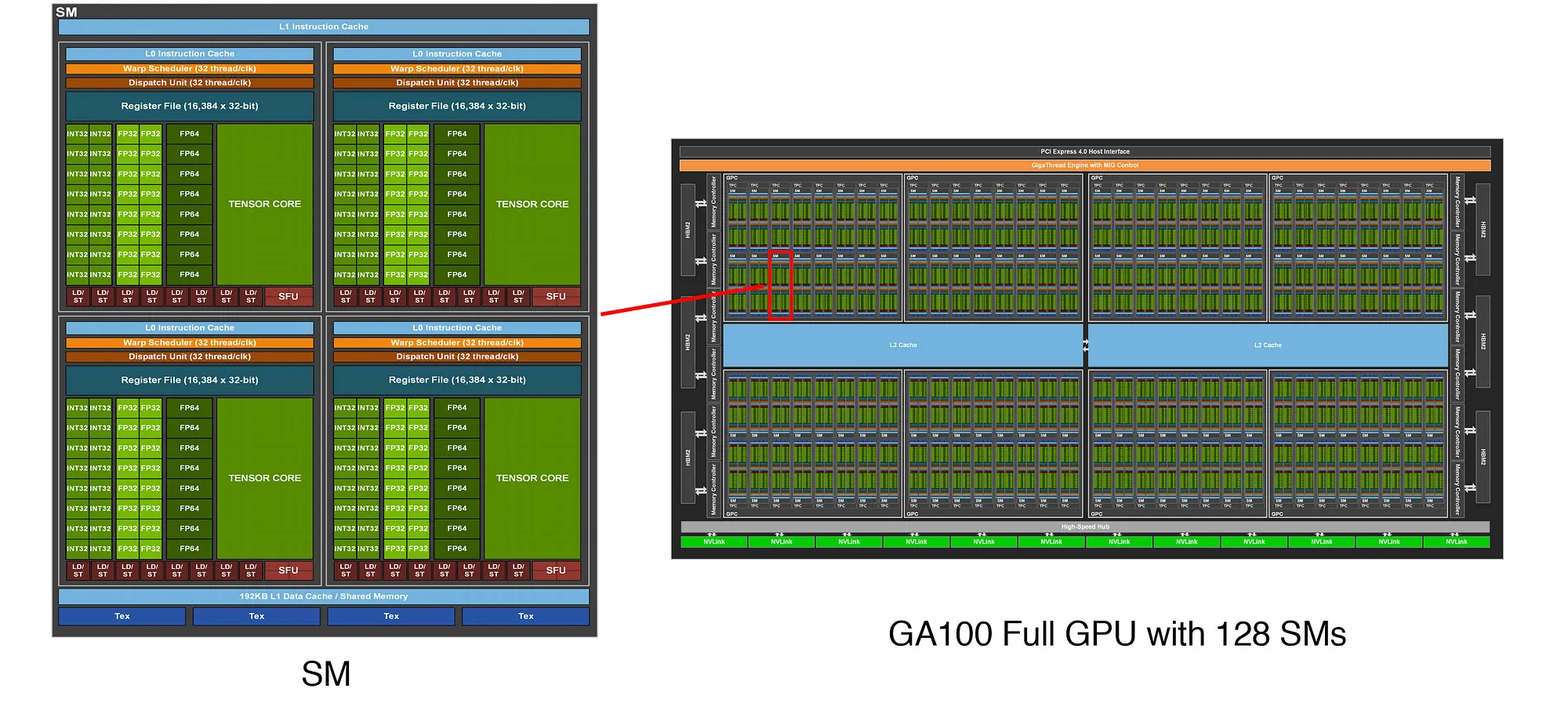
GPU Architecture

计算单元:

  • Streaming Multiprocessors (SMs) [A100: 108个]

内存层次:

  • DRAM [A100: 80GB] - 容量大,速度慢
  • L2 Cache [A100: 40MB]
  • L1 Cache [A100: 192KB per SM] - 容量小,速度快

1.2 执行模型
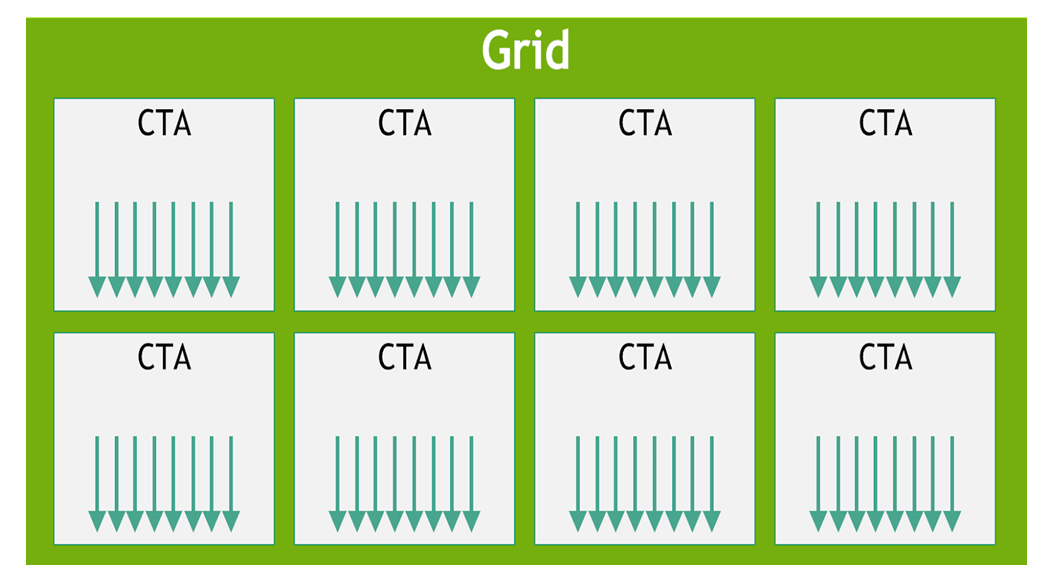
Execution Model

三层结构:

  • Thread(线程): 处理单个索引 i,即执行 f(i)
  • Thread Block(线程块): 调度到单个 SM 上,又称 CTA (Concurrent Thread Arrays)
  • Grid(网格): 线程块的集合

为什么需要 Thread Block?

  • 共享内存(Shared Memory): 线程块内的线程可以共享内存(速度与 L1 Cache 相当)[A100: 164KB]
  • 同步机制: 可以在块内同步线程(但不能跨块同步)
  • 设计原则: 将读取相似数据的 f(i) 分组到一起

1.3 硬件与执行的交互

Wave Quantization

Wave Quantization 问题:

  • 线程块以”波次”调度到 SM 上
  • 最后一波可能线程块较少,导致部分 SM 空闲(低占用率)
  • 解决方案: 让线程块数量能被 SM 数量整除
  • 经验法则: 线程块数量应 >= 4x SM 数量

挑战: 硬件的某些方面对执行模型是隐藏的(如调度策略、SM 数量)

1.4 算术强度 (Arithmetic Intensity)

定义: 算术强度 = FLOPs 数量 / 字节数

  • 高算术强度: 计算密集型(compute-bound)✅ 好
  • 低算术强度: 内存密集型(memory-bound)❌ 差

通用规则:

  • 矩阵乘法:计算密集型
  • 其他大部分操作:内存密集型

Part 2: Benchmarking 和 Profiling

2.1 为什么需要性能测试?

重要性: 必须对代码进行 benchmark 和 profile!

虽然可以阅读规格表和论文,但性能取决于:

  • 库版本
  • 硬件配置
  • 工作负载特性

没有替代品: 必须亲自测试你的代码

2.2 示例:MLP 模型

1
2
3
4
5
6
7
8
9
10
11
class MLP(nn.Module):
"""简单的 MLP: linear -> GeLU -> linear -> GeLU -> ..."""
def __init__(self, dim: int, num_layers: int):
super().__init__()
self.layers = nn.ModuleList([nn.Linear(dim, dim) for _ in range(num_layers)])

def forward(self, x: torch.Tensor):
for layer in self.layers:
x = layer(x)
x = torch.nn.functional.gelu(x)
return x

2.3 Benchmarking:测量时间

目的: 测量操作的实际运行时间

用途:

  • 比较不同实现(哪个更快?)
  • 理解性能如何扩展(如随维度变化)

实现要点:

1
2
3
4
5
6
7
8
9
10
11
12
13
14
15
16
def benchmark(description: str, run: Callable, num_warmups: int = 1, num_trials: int = 3):
# Warmup: 首次运行可能较慢(编译、缓存等)
for _ in range(num_warmups):
run()
torch.cuda.synchronize() # 等待 CUDA 线程完成(重要!)

# 正式计时
times = []
for trial in range(num_trials):
start_time = time.time()
run()
torch.cuda.synchronize() # 重要!
end_time = time.time()
times.append((end_time - start_time) * 1000)

return mean(times)

测试场景:

  • 扩展步数(num_steps)
  • 扩展层数(num_layers)
  • 扩展批大小(batch_size)
  • 扩展维度(dim)

注意: 由于 CUDA kernel 的非均质性、硬件等因素,时间并不总是可预测的

2.4 Profiling:分析瓶颈

目的: 了解时间花在哪里

深层价值: 帮助理解底层调用了什么

PyTorch Profiler:

1
2
3
4
5
6
7
8
9
10
11
12
13
14
15
16
17
18
def profile(description: str, run: Callable, with_stack: bool = False):
# Warmup
for _ in range(num_warmups):
run()
torch.cuda.synchronize()

# 使用 profiler 运行
with torch.profiler.profile(
activities=[ProfilerActivity.CPU, ProfilerActivity.CUDA],
with_stack=with_stack) as prof:
run()
torch.cuda.synchronize()

# 打印表格
table = prof.key_averages().table(sort_by="cuda_time_total",
max_name_column_width=80,
row_limit=10)
return table

观察结果:

  • 可以看到实际调用的 CUDA kernel
  • 不同的 tensor 维度会调用不同的 CUDA kernel
  • Kernel 名称透露实现信息
    • 例如:cutlass_80_simt_sgemm_256x128_8x4_nn_align1
    • cutlass: NVIDIA 的线性代数 CUDA 库
    • 256x128: tile 大小

Flame Graph: 可视化堆栈跟踪,显示时间分布


Part 3: Kernel Fusion 动机

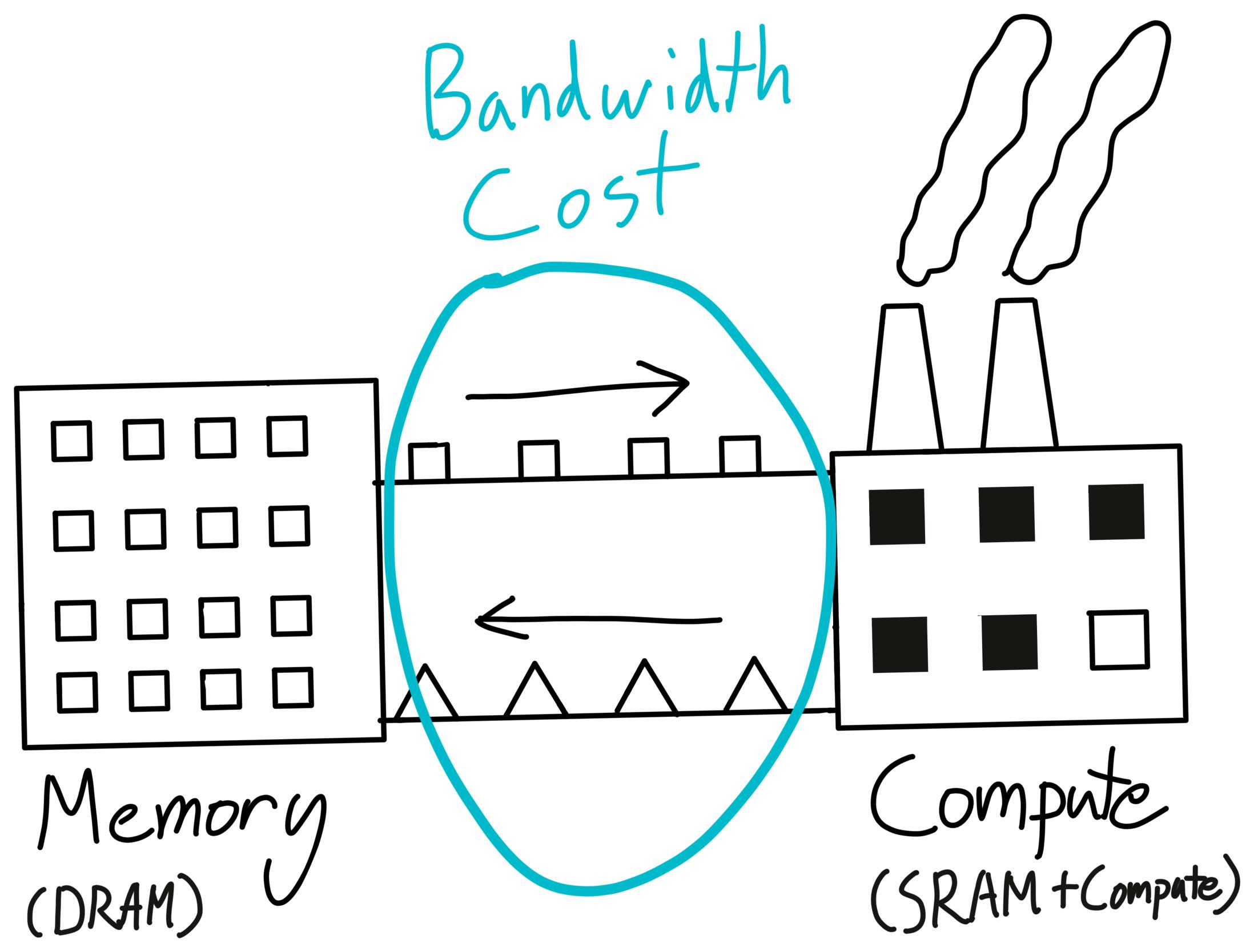
3.1 仓库与工厂的类比

参考: Horace He’s Blog Post

类比:

  • 仓库 ≈ DRAM (HBM)
  • 工厂 ≈ SRAM (L1 Cache / Shared Memory)

Factory Bandwidth

深入理解这个类比

现实世界的工厂运作:

想象你经营一家制造工厂:

  • 仓库(Warehouse): 远离工厂,容量巨大,但运输慢且昂贵
  • 工厂车间(Factory Floor): 空间有限,但工人可以快速拿取材料并加工

最优策略:

  1. 一次性从仓库运来一批原材料
  2. 在工厂车间内完成所有加工步骤
  3. 一次性把成品运回仓库

最差策略:

  1. 从仓库拿原材料 → 加工一步 → 送回仓库
  2. 再从仓库拿 → 加工第二步 → 送回仓库
  3. 重复多次…

每次往返仓库都是巨大的时间浪费!


映射到 GPU 内存:

现实世界 GPU 硬件 特性
仓库 DRAM/HBM 容量大(40-80GB),带宽低(~2 TB/s)
运输卡车 内存总线 带宽有限,往返成本高
工厂车间 SRAM (L1/Shared Memory) 容量小(192KB),带宽高(19 TB/s)
工人 计算单元 (CUDA Cores) 执行实际计算

关键数字对比(A100 GPU):

  • DRAM 带宽: ~2 TB/s(慢 10 倍)
  • SRAM 带宽: ~19 TB/s(快 10 倍)
  • 容量差异: DRAM 是 SRAM 的 ~400,000 倍

未融合操作的问题

场景: 计算 output = gelu(x + bias)

未融合的执行流程:

1
2
3
4
5
6
7
8
9
10
步骤 1: x + bias
DRAM → SRAM: 读取 x (慢)
DRAM → SRAM: 读取 bias (慢)
SRAM 计算: x + bias (快)
SRAM → DRAM: 写入 temp (慢)

步骤 2: gelu(temp)
DRAM → SRAM: 读取 temp (慢!刚写进去又读出来)
SRAM 计算: gelu(temp) (快)
SRAM → DRAM: 写入 output (慢)

内存访问次数:

  • 读取:3 次(x, bias, temp)
  • 写入:2 次(temp, output)
  • 总计:5 次 DRAM 访问 🐌

类比: 就像从仓库拿材料 → 加工一步 → 送回仓库 → 再拿出来 → 加工第二步 → 送回仓库


融合操作的优势

融合后的执行流程:

1
2
3
4
5
6
步骤 1+2: fused_gelu_bias(x, bias)
DRAM → SRAM: 读取 x (慢)
DRAM → SRAM: 读取 bias (慢)
SRAM 计算: temp = x + bias (快)
SRAM 计算: output = gelu(temp) (快,temp 还在 SRAM 中!)
SRAM → DRAM: 写入 output (慢)

内存访问次数:

  • 读取:2 次(x, bias)
  • 写入:1 次(output)
  • 总计:3 次 DRAM 访问

性能提升: 5 → 3,减少了 40% 的内存访问!

类比: 一次性从仓库拿所有材料 → 在工厂内完成所有加工 → 一次性送回成品


为什么内存访问是瓶颈?

计算速度 vs 内存速度的差距:

假设处理 1M 个元素(4MB 数据):

计算时间(在 SRAM 中):

  • 加法:~0.001 ms
  • GeLU:~0.01 ms
  • 总计:可以忽略不计

内存传输时间(DRAM ↔ SRAM):

  • 未融合:5 次 × 4MB ÷ 2TB/s = 0.01 ms
  • 融合:3 次 × 4MB ÷ 2TB/s = 0.006 ms

结论: 内存传输时间 >> 计算时间!

这就是为什么说大多数操作是 memory-bound(内存受限) 而不是 compute-bound(计算受限)。


实际性能数据

GeLU 性能对比(dim=16384):

1
2
3
4
manual_gelu (未融合):    ~2.5 ms
pytorch_gelu (融合): ~0.3 ms
cuda_gelu (手写融合): ~0.5 ms
triton_gelu (融合): ~0.35 ms

融合带来 5-8 倍性能提升!


扩展到更复杂的场景

Transformer 中的典型操作链:

1
2
3
4
5
6
7
8
9
10
# 未融合(灾难)
x = layer_norm(x) # DRAM 读写
x = x + residual # DRAM 读写
x = dropout(x) # DRAM 读写
x = gelu(x) # DRAM 读写
# 总计:8 次 DRAM 访问

# 融合(高效)
x = fused_ln_residual_dropout_gelu(x, residual)
# 总计:2 次 DRAM 访问(读 x 和 residual,写 output)

性能提升: 可达 4-10 倍!


关键洞察总结

  1. DRAM 是瓶颈: 不是计算慢,是数据搬运慢
  2. SRAM 是宝贵资源: 容量小但速度快,要充分利用
  3. 最小化往返次数: 每次 DRAM 访问都是昂贵的
  4. 在 SRAM 中完成尽可能多的工作: 这就是 kernel fusion 的本质

记住: GPU 编程的核心不是”让计算更快”,而是”让数据搬运更少”!

这就是为什么 FlashAttention、Fused LayerNorm 等优化如此重要——它们都在减少内存往返次数。

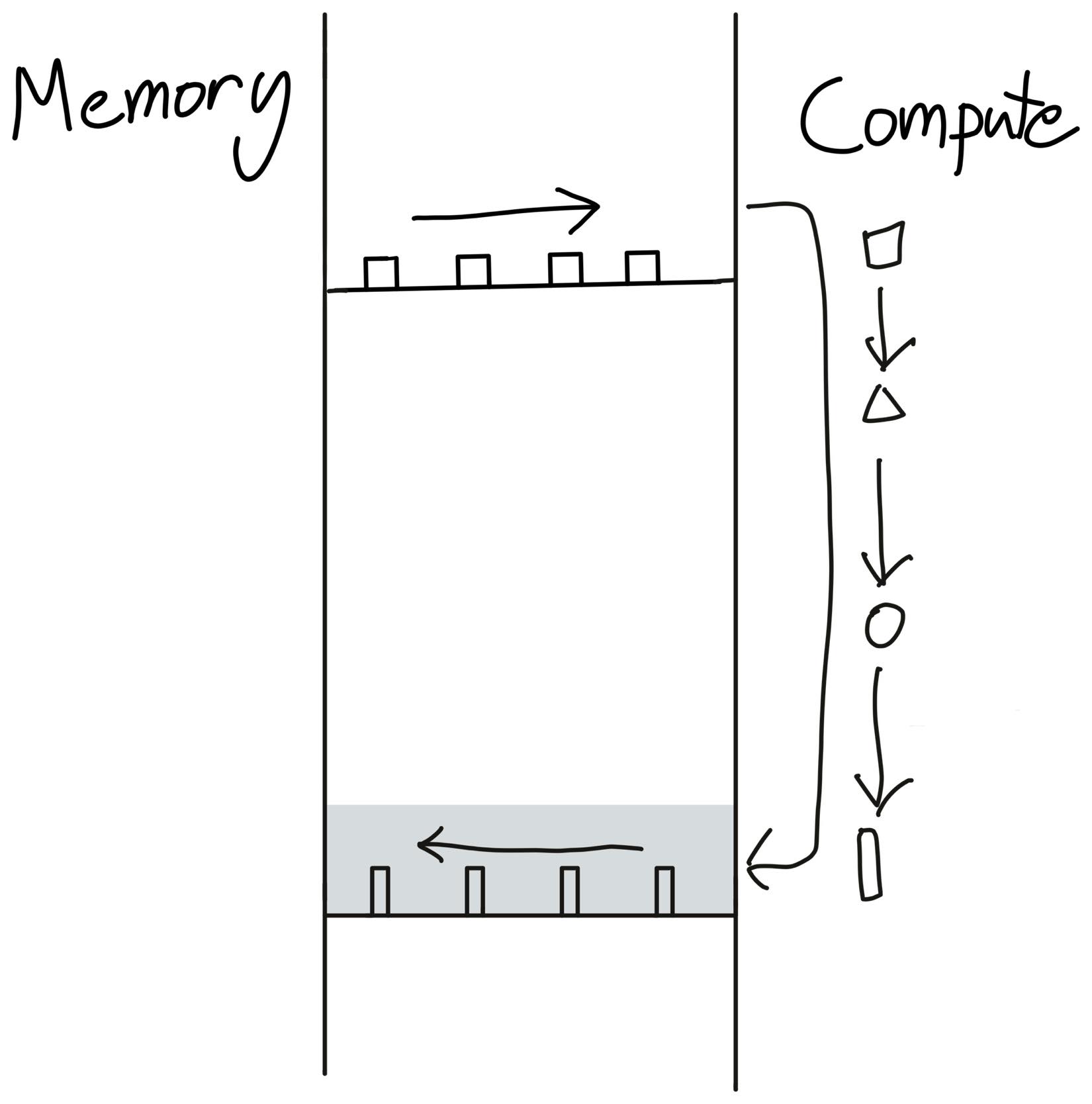
3.2 未融合 vs 融合

未融合操作: 每个操作都需要 读取 → 计算 → 写入
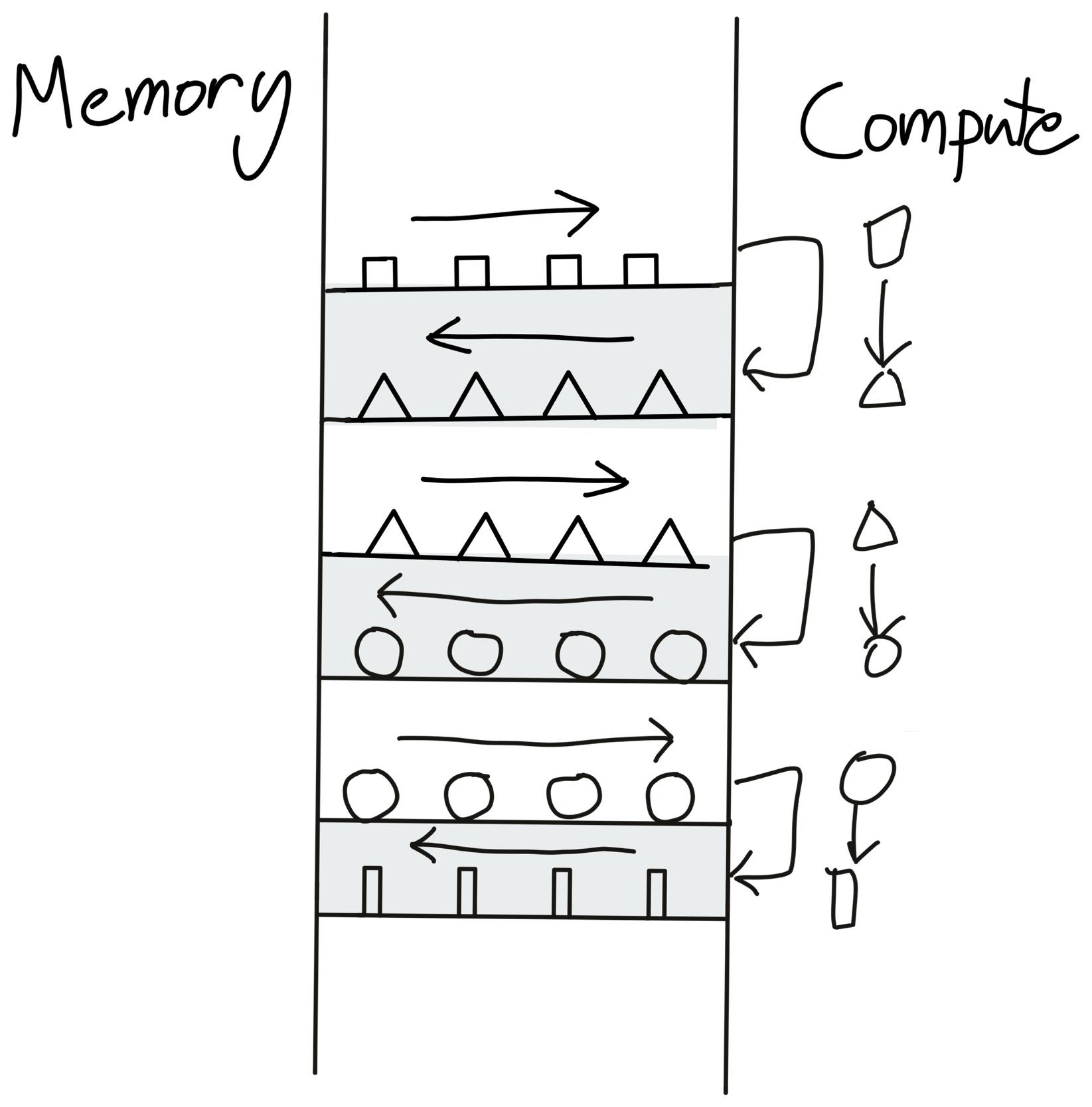
Multi Operators

融合操作: 只需要读写一次

Operator Fusion

3.3 案例:GeLU 激活函数

GeLU 公式:

1
gelu(x) = 0.5 * x * (1 + tanh(sqrt(2/π) * (x + 0.044715 * x³)))

两种实现方式:

  1. Manual GeLU(未融合):

    1
    2
    3
    4
    5
    def manual_gelu(x):
    return 0.5 * x * (1 + torch.tanh(
    torch.sqrt(torch.tensor(2.0 / torch.pi)) *
    (x + 0.044715 * torch.pow(x, 3))
    ))
  2. PyTorch GeLU(融合):

    1
    2
    def pytorch_gelu(x):
    return torch.nn.functional.gelu(x)

性能对比:

  • 融合版本显著更快
  • Manual 版本调用多个 kernel
  • PyTorch 版本只调用一个 kernel

关键洞察: 记住仓库/工厂的类比!


Part 4: CUDA Kernels

4.1 CUDA 基础

CUDA 是什么?

  • C/C++ 的扩展,带有管理 GPU 的 API
  • 简化模型:编写 f(i),CUDA kernel 为所有 i 计算 f(i)

编程模型:

  • Grid: 线程块集合,如 numBlocks = (2, 4), blockDim = (1, 8)
  • Thread Block: 线程集合,如 blockIdx = (0, 1)
  • Thread: 单个操作单元,如 threadIdx = (0, 3)

编程方式:

  • 编写单个线程执行的代码
  • 使用 (blockIdx, blockDim, threadIdx) 确定要做什么

4.2 CUDA GeLU 实现

CUDA 代码示例(gelu.cu):

1
2
3
4
5
6
7
8
9
10
11
12
13
14
15
16
17
18
19
20
21
22
23
24
25
26
27
28
#include <torch/extension.h>
#include <cuda_runtime.h>

__global__ void gelu_kernel(const float* x, float* y, int n) {
int idx = blockIdx.x * blockDim.x + threadIdx.x;
if (idx < n) {
float val = x[idx];
float a = 0.79788456f * (val + 0.044715f * val * val * val);
float exp_2a = expf(2.0f * a);
float tanh_a = (exp_2a - 1.0f) / (exp_2a + 1.0f);
y[idx] = 0.5f * val * (1.0f + tanh_a);
}
}

torch::Tensor gelu(torch::Tensor x) {
auto y = torch::empty_like(x);
int n = x.numel();
int threads = 256;
int blocks = (n + threads - 1) / threads;

gelu_kernel<<<blocks, threads>>>(
x.data_ptr<float>(),
y.data_ptr<float>(),
n
);

return y;
}

编译和使用:

1
2
3
4
5
6
7
8
9
10
11
12
from torch.utils.cpp_extension import load_inline

module = load_inline(
cuda_sources=[cuda_gelu_src],
cpp_sources=[cpp_gelu_src],
functions=["gelu"],
extra_cflags=["-O2"],
name="inline_gelu",
build_directory="var/cuda_gelu",
)

cuda_gelu = module.gelu

性能:

  • CUDA 实现比 manual 快
  • 但不如 PyTorch 实现

局限性:

  • 逐元素操作在 CUDA 中容易实现
  • 但大多数有趣的操作(matmul、softmax、RMSNorm)需要读取多个值
  • 需要考虑共享内存管理等

Part 5: Triton Kernels

5.1 Triton 简介

开发者: OpenAI (2021)
目标: 让 GPU 编程更易用

优势:

  • 用 Python 编写
  • 思考线程块而非单个线程

Triton vs CUDA:

1
2
3
4
5
                                    CUDA      Triton
内存合并(从 DRAM 传输) 手动 自动
共享内存管理 手动 自动
SM 内调度 手动 自动
跨 SM 调度 手动 手动

关键点: 编译器做更多工作,实际上可以超越 PyTorch 实现!

5.2 Triton GeLU 实现

1
2
3
4
5
6
7
8
9
10
11
12
13
14
15
16
17
18
19
20
21
22
23
24
25
26
27
28
29
30
31
32
33
34
35
@triton.jit
def triton_gelu_kernel(x_ptr, y_ptr, num_elements, BLOCK_SIZE: tl.constexpr):
# 输入在 x_ptr,输出在 y_ptr
# | Block 0 | Block 1 | ... |
# BLOCK_SIZE num_elements

pid = tl.program_id(axis=0)
block_start = pid * BLOCK_SIZE

# 此线程块应操作的索引
offsets = block_start + tl.arange(0, BLOCK_SIZE)

# 处理边界
mask = offsets < num_elements

# 读取
x = tl.load(x_ptr + offsets, mask=mask)

# 计算 gelu (使用 tanh(a) = (exp(2a) - 1) / (exp(2a) + 1))
a = 0.79788456 * (x + 0.044715 * x * x * x)
exp = tl.exp(2 * a)
tanh = (exp - 1) / (exp + 1)
y = 0.5 * x * (1 + tanh)

# 存储
tl.store(y_ptr + offsets, y, mask=mask)

def triton_gelu(x: torch.Tensor):
y = torch.empty_like(x)
num_elements = x.numel()
block_size = 1024
num_blocks = triton.cdiv(num_elements, block_size)

triton_gelu_kernel[(num_blocks,)](x, y, num_elements, BLOCK_SIZE=block_size)
return y

调试优势: 可以单步调试 Python 代码!

5.3 PTX 汇编

PTX (Parallel Thread Execution): GPU 的类汇编语言

可以查看 Triton 生成的 PTX 代码:

  • ld.global.*st.global.*:从全局内存读写
  • %ctaid.x:块索引,%tid.x:线程索引
  • %f*:浮点寄存器,%r*:整数寄存器
  • Thread Coarsening: 一个线程同时处理 8 个元素

性能对比:

  • Triton 实现几乎与 PyTorch 一样好
  • 实际上比我们的朴素 CUDA 实现慢
  • 但都远快于 manual 实现

原因:

  • Triton 操作块,CUDA 操作线程
  • 块允许 Triton 编译器进行其他优化(如线程粗化)

Part 6: PyTorch 编译

6.1 torch.compile

第五种方式: 用 Python 编写,编译成 Triton

1
compiled_gelu = torch.compile(manual_gelu)

优势:

  • 自动融合操作
  • 无需手写 CUDA 或 Triton
  • 性能接近手写实现

检查正确性:

1
check_equal(compiled_gelu, manual_gelu)

性能: 与 Triton 手写版本相当


Part 7: Softmax 案例研究

7.1 Softmax 操作

定义: 对矩阵的每一行进行归一化

1
2
[A1 A2 A3]   =>   [A1/A A2/A A3/A]
[B1 B2 B3] => [B1/B B2/B B3/B]

用途:

  • Attention 机制
  • 生成概率分布

7.2 Manual Softmax(未融合)

1
2
3
4
5
6
7
8
9
10
11
def manual_softmax(x):
# 数值稳定性:减去最大值
x_max = x.max(dim=-1, keepdim=True)[0]
x_shifted = x - x_max

# 计算 exp
exp_x = torch.exp(x_shifted)

# 归一化
sum_exp = exp_x.sum(dim=-1, keepdim=True)
return exp_x / sum_exp

问题: 多次读写内存

7.3 Triton Softmax(融合)

1
2
3
4
5
6
7
8
9
10
11
12
13
14
15
16
17
18
19
20
21
22
23
24
25
26
27
28
29
30
31
@triton.jit
def triton_softmax_kernel(
input_ptr, output_ptr,
n_rows, n_cols,
BLOCK_SIZE: tl.constexpr
):
# 每个程序处理一行
row_idx = tl.program_id(0)
row_start_ptr = input_ptr + row_idx * n_cols

# 列偏移
col_offsets = tl.arange(0, BLOCK_SIZE)
mask = col_offsets < n_cols

# 加载行
row = tl.load(row_start_ptr + col_offsets, mask=mask, other=-float('inf'))

# 减去最大值(数值稳定性)
row_max = tl.max(row, axis=0)
row_shifted = row - row_max

# 计算 exp 和 sum
numerator = tl.exp(row_shifted)
denominator = tl.sum(numerator, axis=0)

# 归一化
softmax_output = numerator / denominator

# 写回
output_row_start_ptr = output_ptr + row_idx * n_cols
tl.store(output_row_start_ptr + col_offsets, softmax_output, mask=mask)

关键优化:

  • 每个线程块处理一行
  • 所有操作在共享内存中完成
  • 只读写一次全局内存

7.4 性能对比

1
2
3
4
manual_time = benchmark("manual_softmax", ...)
compiled_time = benchmark("compiled_softmax", ...)
pytorch_time = benchmark("pytorch_softmax", ...)
triton_time = benchmark("triton_softmax", ...)

结果:

  • 融合版本显著快于未融合版本
  • Triton 和 torch.compile 性能接近 PyTorch

总结

核心概念

  1. 编程模型与硬件的差距 → 性能之谜

    • PyTorch、Triton、PTX 与实际硬件之间存在抽象层
  2. Benchmarking → 理解扩展性

    • 测量不同配置下的性能
  3. Profiling → 理解内部机制

    • 了解 PyTorch 函数的底层实现(最终是 kernel)
  4. PTX 汇编 → 理解 CUDA kernel 内部

    • 查看实际生成的指令

五种编写函数的方式

  1. Manual(手动): 用 PyTorch 操作组合
  2. PyTorch: 使用内置函数
  3. Compiled: torch.compile 自动优化
  4. CUDA: 手写 C++/CUDA 代码
  5. Triton: 用 Python 编写 GPU kernel

示例操作:

  • GeLU(逐元素)
  • Softmax(按行)
  • Matmul(复杂聚合)

关键原则

核心原则: 组织计算以最小化读写

关键思想:

  • Kernel Fusion(算子融合): 仓库/工厂类比
  • Tiling(分块): 使用共享内存

未来展望:

  • 自动编译器(Triton、torch.compile)会越来越好
  • 但理解底层原理仍然重要

延伸阅读


实践建议

  1. 每次修改后都要 benchmark/profile!
  2. 从简单实现开始,逐步优化
  3. 使用 profiler 找出瓶颈
  4. 理解内存访问模式
  5. 考虑算子融合机会
  6. 设置 CUDA_LAUNCH_BLOCKING=1 以便调试
  7. 设置 TRITON_INTERPRET=0 以获得最佳性能

大模型从0到1|第六讲:手写高性能算子
https://realwujing.github.io/linux/drivers/gpu/stanford-cs336/大模型从0到1|第六讲:手写高性能算子/
作者
Wu Jing
发布于
2025年11月23日
许可协议